Level Indicating Controller LFC128-2
USER GUIDE FOR LEVEL INDICATING CONTROLLER LFC128-2
| LFC128-2-MN-EN-01 |
JUN-2020 |
This document is applied for the following products
| SKU | LFC128-2 | HW Ver. | 1.0 | FW Ver. | 1.1 |
| Item Code |
LFC128-2 | Level Indicating Controller, 4AI/DI, 4DI, 4xRelay, 1xPulse Output, 2 x RS485/ModbusRTU-Slave Communication | |||
1. Functions Change Log
| HW Ver. | FW Ver. | Release Date | Functions Change |
| 1.0 | 1.1 | JUN-2020 |
|
|
|
2. Introduction
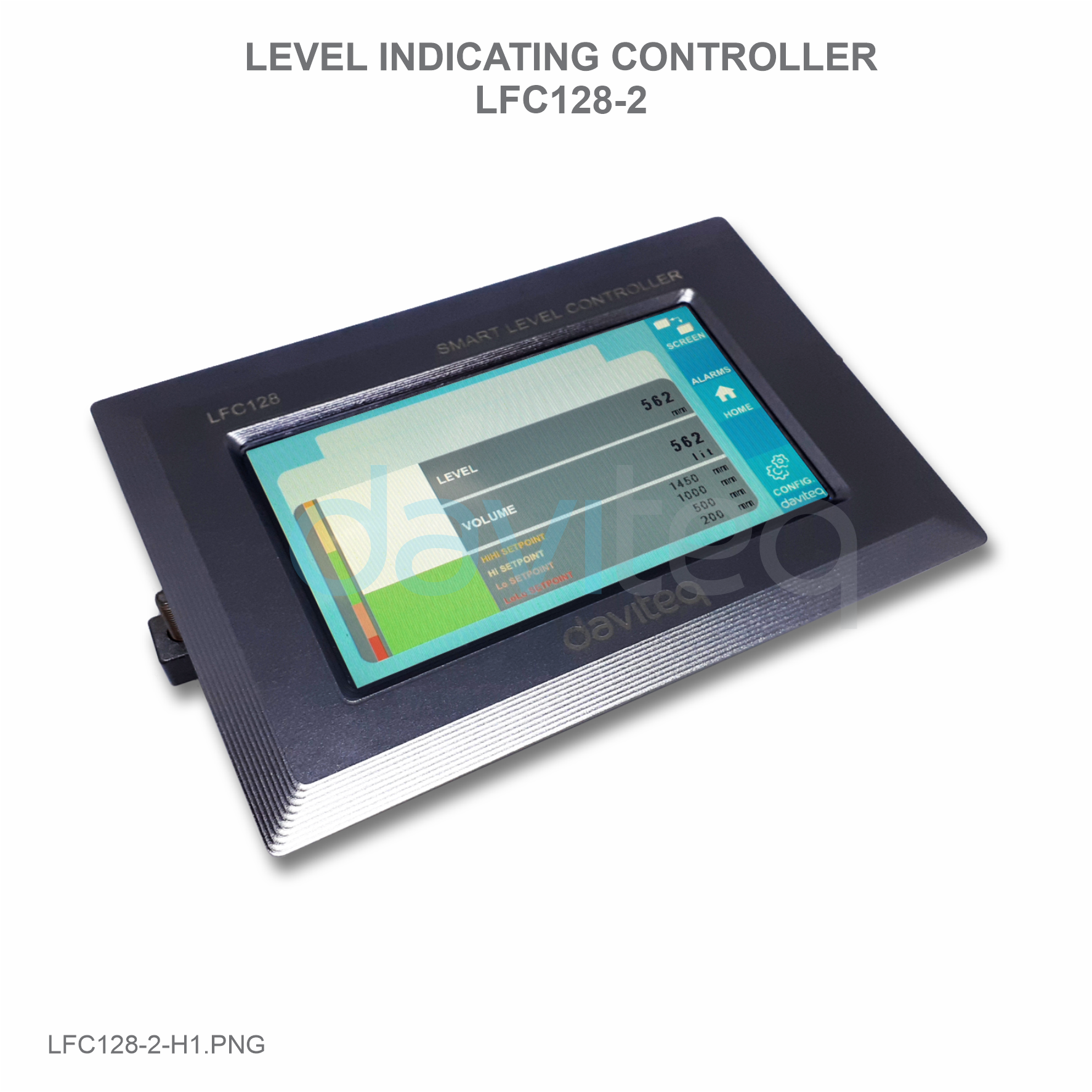
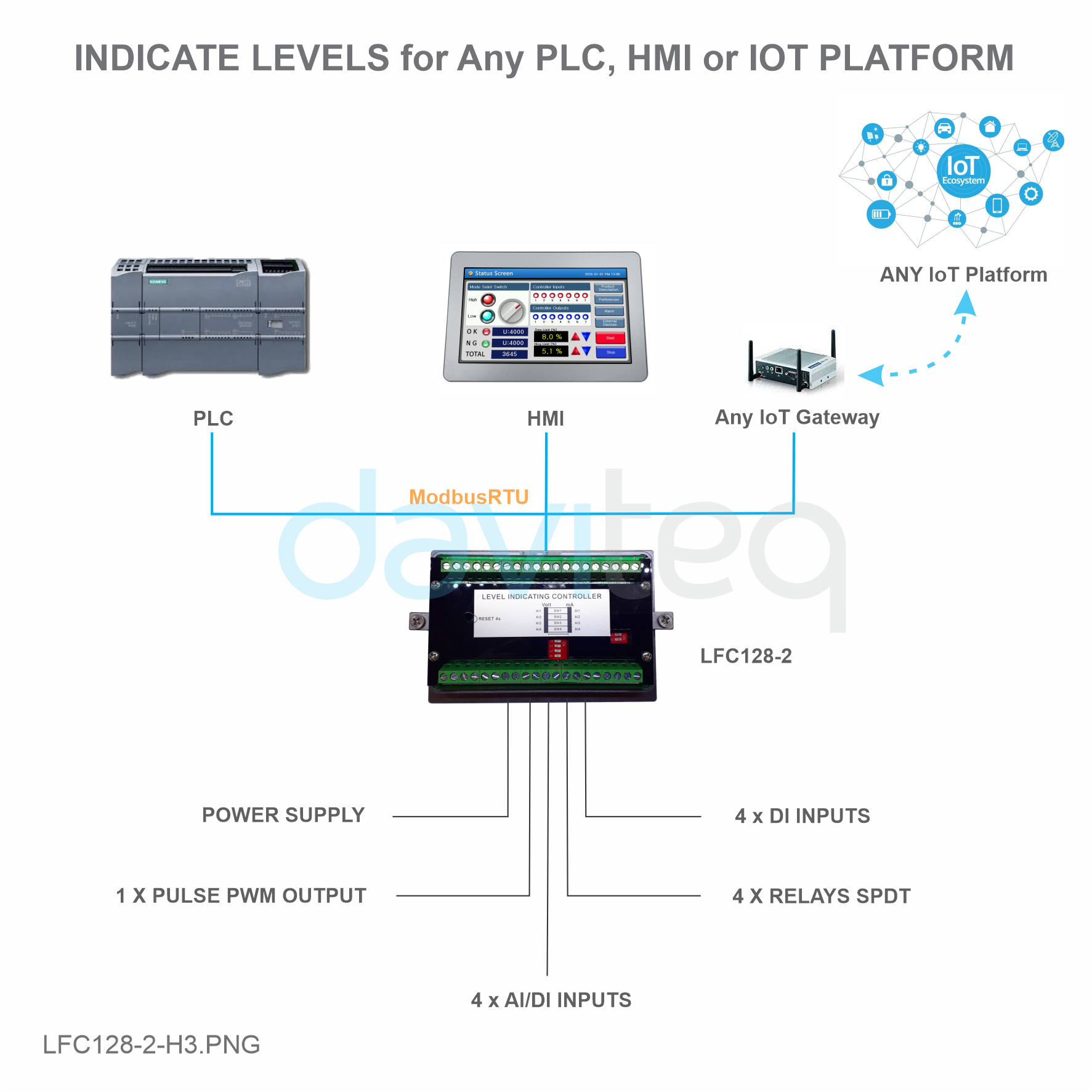
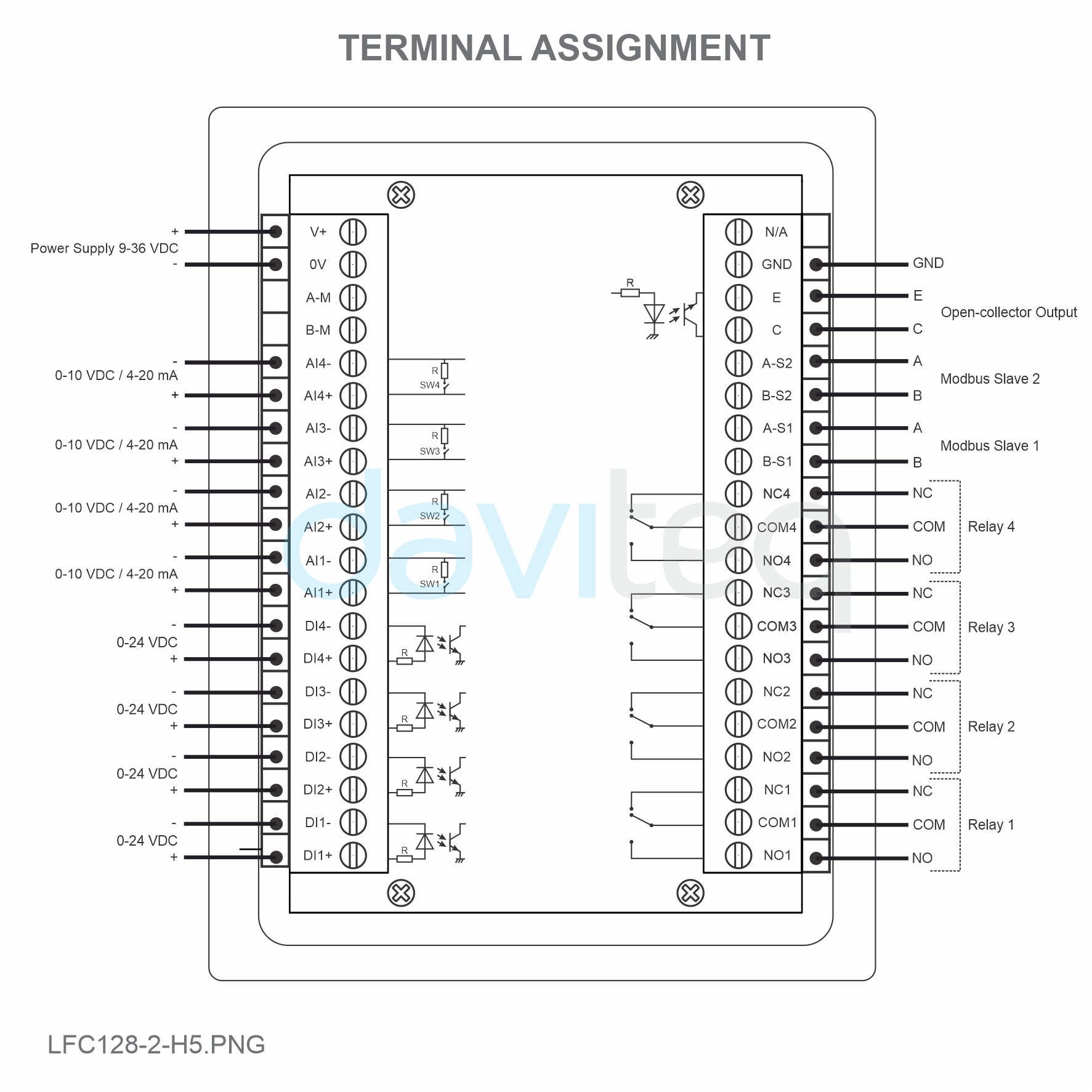
LFC128-2 is an advanced level display controller. The product integrates Modbus RTU interface to help PLC / SCADA / BMS and any IoT port can connect to monitor. LFC128-2 has a simple yet powerful design with 4 AI / DI, 4 DI, 4 Relays, 1 Pulse pulse output, 2 RS485 Slave ModbusRTU allowing them to connect with multiple devices easily. With advanced technology that provides high stability and reliability, many functions, easy installation with touch screen and friendly interface helps visually monitor level.
3. Specification
| Digital Inputs | 04 x Ports, opto-coupler, 4.7 kohms input resisrtance, 5000V rms isolation, Logic 0 (0-1VDC), Logic 1 (5-24VDC), Functions: logic status 0/1 or Pulse counting (32 bit counter with max 4kHz pulse) |
| Analog Inputs |
04 x Ports, select between 0-10VDC input or 0-20mA input, 12 bit Resolution, can be configured as Digital input by DIP switch (max 10VDC input) The AI1 port is a 0-10 VDC / 4-20 mA level sensor connection port |
| Relay Output | 04 x Ports, electro-mechanical Relays, SPDT, contact rating 24VDC/2A or 250VAC/5A, LED indicators |
| Pulse Output | 01 x Ports, open-collector, opto-isolation, max 10mA and 80VDC, On/off control, Pulser (max 2.5Khz, max 65535 Pulses) or PWM (max 2.5Khz) |
| Communication | 02 x ModbusRTU-Slave, RS485, speed 9600 or 19200, LED indicator |
| Reset button | For resetting 02 x RS485 Slave port to default setting (9600, None parity, 8 bit) |
| Screen type | Touch screen |
| Power supply | 9..36VDC |
| Consumption | 200mA @ 24VDC supply |
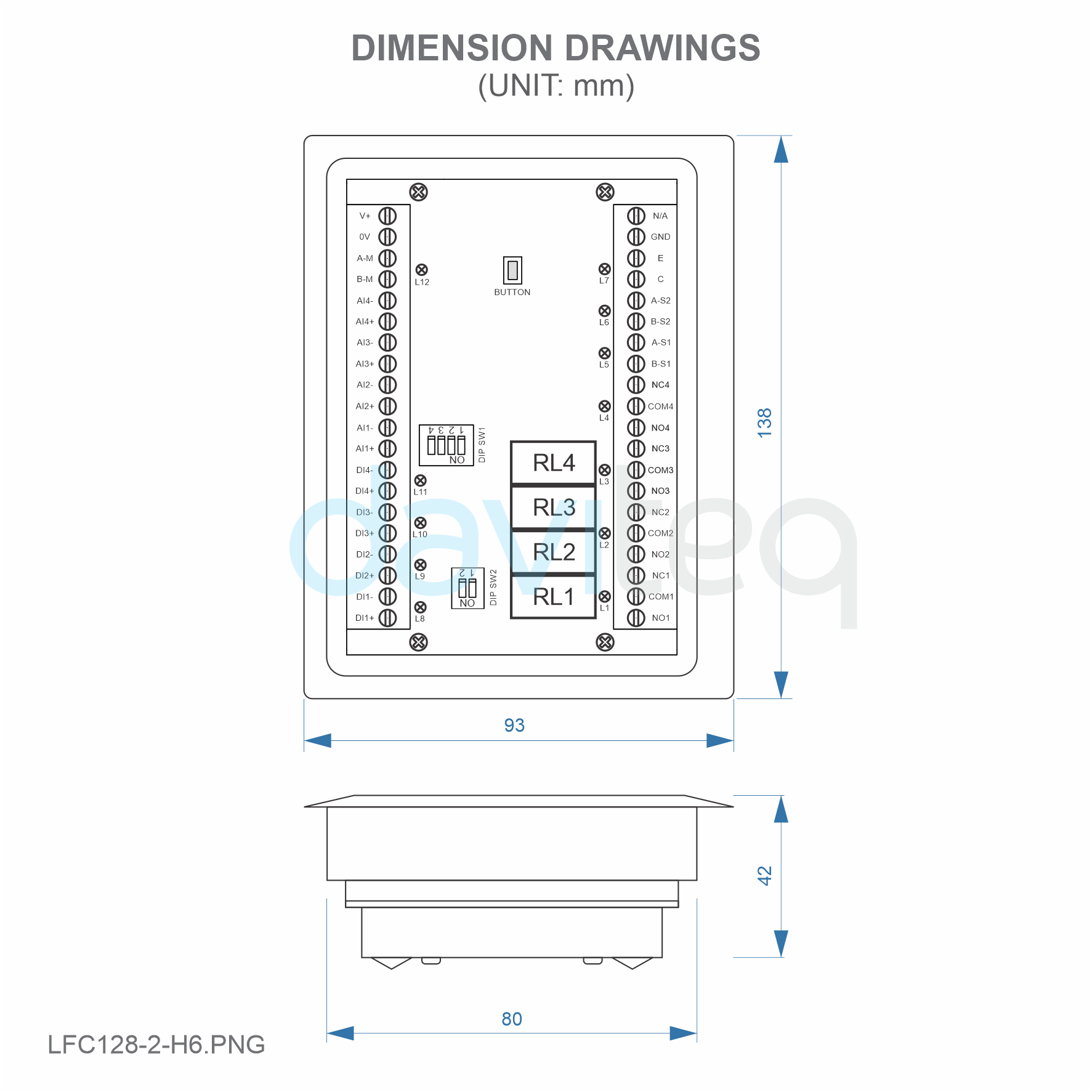
| Mounting type | Panel mount |
| Terminal Block | pitch 5.0mm, rating 300VAC, wire size 12-24AWG |
| Working temperature/humidity | 0..60 degC / 95%RH non-condensing |
| Dimension | H93xW138xD45 |
| Net weight | 390 grams |
4. Product Pictures
|
 |
 |
 |
 |
 |
5. Operation Principle
5.1 Modbus communication
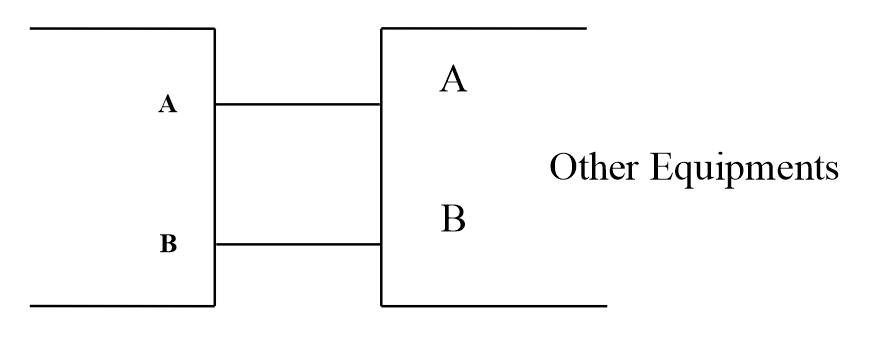
02 x RS485/ModbusRTU-Slave
Protocol: Modbus RTU
Address: 1 - 247, 0 is the Broadcast address
Baud rate: 9600 , 19200
Parity: none, odd, even
Status indicator LED:
- Led on: modbus communication OK
- Led blinking: received data but modbus communication incorrect, due to wrong Modbus configuration: address, baudrate
- Led off: LFC128-2 received no data, check the connection
Memmap resgisters
READ uses command 03, WRITE uses command 16
Default configuration:
- Address: 1
- Baudrate slave 1: 9600
- Parity slave 1: none
- Baudrate slave 2: 9600
- Parity slave 2: none
|
Modbus Register |
Hex adr |
# of registers |
Description |
Range |
Default |
Format |
Property |
Comment |
|
0 |
0 |
2 |
device info |
LFC1 |
string |
Read |
|
|
|
8 |
8 |
1 |
DI1___DI2: digital status |
0-1 |
uint8 |
Read |
H_byte: DI1 |
|
|
9 |
9 |
1 |
DI3___DI4: digital status |
0-1 |
uint8 |
Read |
H_byte: DI3 |
|
|
10 |
A |
1 |
AI1___AI2: digital status |
0-1 |
uint8 |
Read |
H_byte: AI1 |
|
|
11 |
B |
1 |
AI3___AI4: digital status |
0-1 |
uint8 |
Read |
H_byte: AI3 |
|
|
12 |
C |
1 |
AI1: analog value |
uint16 |
Read |
|||
|
13 |
D |
1 |
AI2: analog value |
uint16 |
Read |
|||
|
14 |
E |
1 |
AI3: analog value |
uint16 |
Read |
|||
|
15 |
F |
1 |
AI4: analog value |
uint16 |
Read |
|||
|
16 |
10 |
2 |
AI1: scaled value |
float |
Read |
|||
|
18 |
12 |
2 |
AI2: scaled value |
float |
Read |
|||
|
20 |
14 |
2 |
AI3: scaled value |
float |
Read |
|||
|
22 |
16 |
2 |
AI4: scaled value |
float |
Read |
|||
|
24 |
18 |
1 |
relay 1 |
0-1 |
uint16 |
Read |
||
|
25 |
19 |
1 |
relay 2 |
0-1 |
uint16 |
Read |
||
|
26 |
1A |
1 |
relay 3 |
0-1 |
uint16 |
Read |
||
|
27 |
1B |
1 |
relay 4 |
0-1 |
uint16 |
Read |
||
|
28 |
1C |
1 |
open collector ctrl |
0-3 |
uint16 |
Read/Write |
0: off |
|
|
30 |
1E |
2 |
counter DI1 |
uint32 |
Read/Write |
counter writable, erasable |
||
|
32 |
20 |
2 |
counter DI2 |
uint32 |
Read/Write |
counter writable, erasable |
||
|
34 |
22 |
2 |
counter DI3 |
uint32 |
Read/Write |
counter writable, erasable |
||
|
36 |
24 |
2 |
counter DI4 |
uint32 |
Read/Write |
counter writable, erasable |
||
|
38 |
26 |
2 |
counter AI1 |
uint32 |
Read/Write |
counter writable, erasable, max frequency 10Hz |
||
|
40 |
28 |
2 |
counter AI2 |
uint32 |
Read/Write |
counter writable, erasable, max frequency 10Hz |
||
|
42 |
2A |
2 |
counter AI3 |
uint32 |
Read/Write |
counter writable, erasable, max frequency 10Hz |
||
|
44 |
2C |
2 |
counter AI4 |
uint32 |
Read/Write |
counter writable, erasable, max frequency 10Hz |
||
|
46 |
2E |
2 |
DI1: time on |
uint32 |
Read/Write |
sec |
||
|
48 |
30 |
2 |
DI2: time on |
uint32 |
Read/Write |
sec |
||
|
50 |
32 |
2 |
DI3: time on |
uint32 |
Read/Write |
sec |
||
|
52 |
34 |
2 |
DI4: time on |
uint32 |
Read/Write |
sec |
||
|
54 |
36 |
2 |
AI1: time on |
uint32 |
Read/Write |
sec |
||
|
56 |
38 |
2 |
AI2: time on |
uint32 |
Read/Write |
sec |
||
|
58 |
3A |
2 |
AI3: time on |
uint32 |
Read/Write |
sec |
||
|
60 |
3C |
2 |
AI4: time on |
uint32 |
Read/Write |
sec |
||
|
62 |
3E |
2 |
DI1: time off |
uint32 |
Read/Write |
sec |
||
|
64 |
40 |
2 |
DI2: time off |
uint32 |
Read/Write |
sec |
||
|
66 |
42 |
2 |
DI3: time off |
uint32 |
Read/Write |
sec |
||
|
68 |
44 |
2 |
DI4: time off |
uint32 |
Read/Write |
sec |
||
|
70 |
46 |
2 |
AI1: time off |
uint32 |
Read/Write |
sec |
||
|
72 |
48 |
2 |
AI2: time off |
uint32 |
Read/Write |
sec |
||
|
74 |
4A |
2 |
AI3: time off |
uint32 |
Read/Write |
sec |
||
|
76 |
4C |
2 |
AI4: time off |
uint32 |
Read/Write |
sec |
||
|
128 |
80 |
2 |
counter DI1 |
uint32 |
Read |
counter cannot write, erase |
||
|
130 |
82 |
2 |
counter DI2 |
uint32 |
Read |
counter cannot write, erase |
||
|
132 |
84 |
2 |
counter DI3 |
uint32 |
Read |
counter cannot write, erase |
||
|
134 |
86 |
2 |
counter DI4 |
uint32 |
Read |
counter cannot write, erase |
||
|
136 |
88 |
2 |
counter AI1 |
uint32 |
Read |
counter cannot write, erase; max frequency 10Hz |
||
|
138 |
8A |
2 |
counter AI2 |
uint32 |
Read |
counter cannot write, erase; max frequency 10Hz |
||
|
140 |
8C |
2 |
counter AI3 |
uint32 |
Read |
counter cannot write, erase; max frequency 10Hz |
||
|
142 |
8E |
2 |
counter AI4 |
uint32 |
Read |
counter cannot write, erase; max frequency 10Hz |
||
| 256 | 100 | 1 | modbus address slave | 1-247 | 1 | uint16 | Read/Write | |
| 257 | 101 | 1 | modbus baudrate slave 1 | 0-1 | 0 | uint16 | Read/Write | 0: 9600, 1: 19200 |
| 258 | 102 | 1 | modbus parity slave 1 | 0-2 | 0 | uint16 | Read/Write | 0: none, 1: odd, 2: even |
5.2 Reset Button
When holding the reset button for 4 seconds, LFC 128-2 will reset the default configuration to 02 x RS485 / Modbus RTU-Slave.
Default Modbus RTU Configuration:
- Address: 1
- Baud Rate: 9600
- Parity: none
5.3 Digital Input
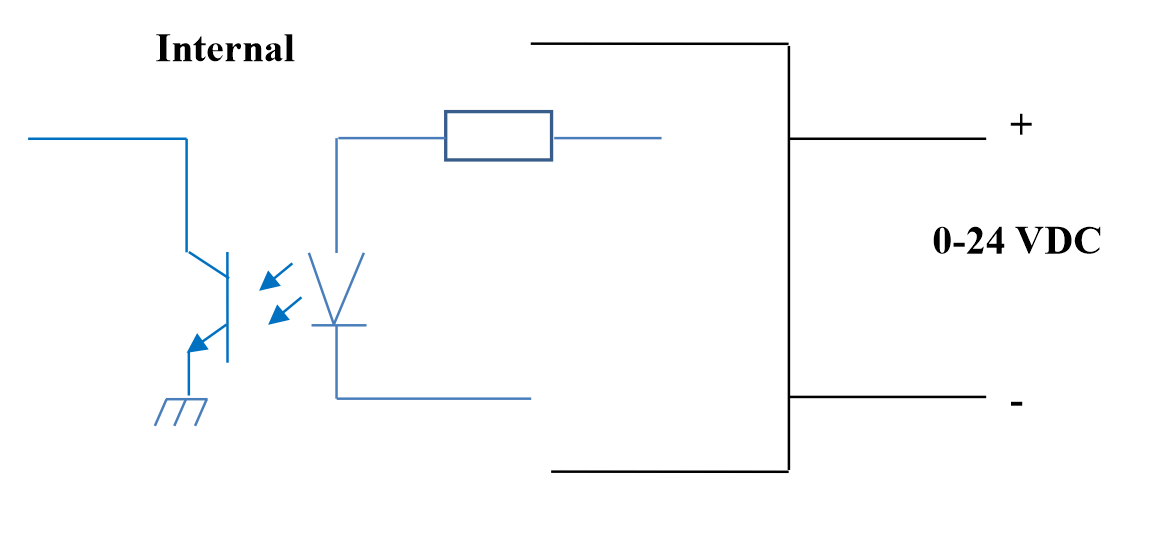
Specification:
- 04 channels DI, isolated
- Input Resistance: 4.7 kΏ
- Isolation Voltage: 5000Vrms
- Logic level 0: 0-1V
- Logic level 1: 5-24V
- Function:
- Read logic 0/1
- Pulse Counter
5.3.1 Read the logical state 0/1
Logic value in Modbus Memory Map: 0-1
Registers to store logic values in the Modbus Memory Map:
- DI1__DI2: digital status: stores the logical state of channel 1 and channel 2.
- H_byte: DI1
- L_byte: DI2
- DI3__DI4: digital status: store the logical state of channel 3 and channel 4.
- H_byte: DI3
- L_byte: DI4
5.3.2 Pulse Counter
Counter value in Modbus Memory Map, when adding the number exceeds the threshold, it will automatically return: 0 - 4294967295 (32bits)
The register that stores Counter value in the Modbus Memory Map cannot be erased:
- Counter DI1: stores the logic state of channel 1
- Counter DI2: stores the logic state of channel 2
- Counter DI3: store the logic state of channel 3
- Counter DI4: stores the logic state of channel 4
The register that stores Counter value in the Modbus Memory Map cannot be erased:
- None reset counter DI1: stores the logic state of channel 1
- None reset counter DI2: stores the logic state of channel 2
- None reset counter DI3: stores the logic state of channel 3
- None reset counter DI4: stores the logic state of channel 4
Pulse Counter Mode:
Low-speed pulse count less than 10Hz with filter, anti-jamming:
- Set register "counter DI1: filter time" = 500-2000: Channel 1 counts pulses less than 10Hz
- Set register "counter DI2: filter time" = 500-2000: Channel 2 counts pulses less than 10Hz
- Set register "counter DI3: filter time" = 500-2000: Channel 3 counts pulses less than 10Hz
- Set register "counter DI4: filter time" = 500-2000: Channel 4 counts pulses less than 10Hz
High-speed pulse count with max 2KHz frequency without filter:
- Set register "counter DI1: filter time" = 1: channel 1 counts pulses with Fmax = 2kHz
- Set register "counter DI2: filter time" = 1: channel 2 counts pulses with Fmax = 2kHz
- Set register "counter DI3: filter time" = 1: channel 3 counts pulses with Fmax = 2kHz
- Set register "counter DI4: filter time" = 1: channel 4 counts pulses with Fmax = 2kHz
5.4 Analog Input
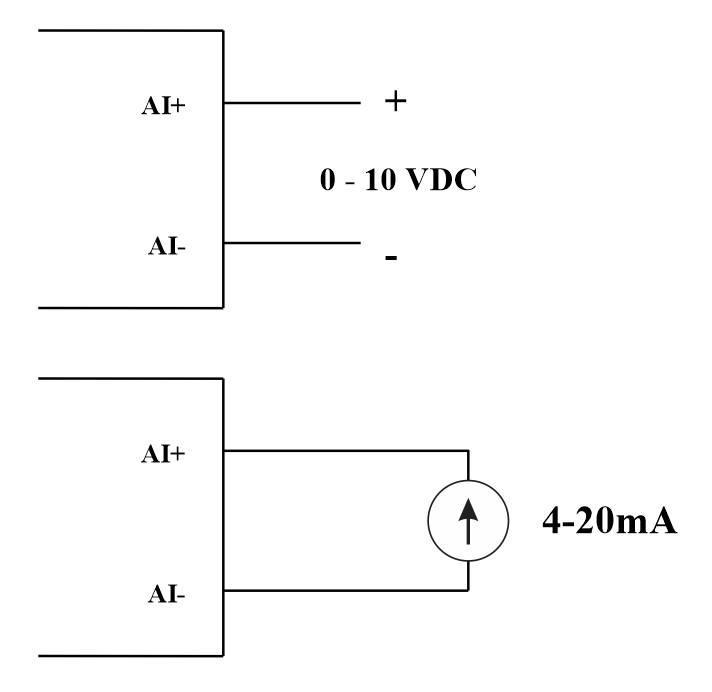
04 AI channels, no isolation (AI1 is a 4-20mA / 0-5 VDC / 0-10 VDC level sensor input)
Use DIP SW to configure Analog input: 0-10V, 0-20mA
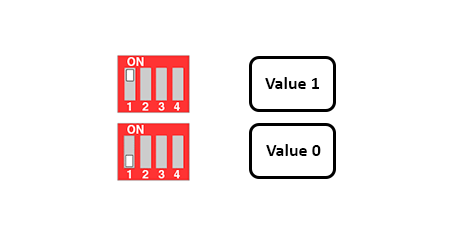
| Value | Type of AI |
| 0 |
0-10 V |
| 1 |
0-20 mA |
Input type:
- Measure voltage: 0-10V
- Measure current: 0-20mA
- The configuration for AI reads the same logical state as DI, but it is not isolated with a pulse range of 0-24V
Input impedance:
- Measure voltage: 320 kΏ
- Measure the current: 499 Ώ
5.4.1 Read the Analog value
Resolution 12 bits
Non-Linearity: 0.1%
Analog value in Modbus Memory Map: 0-3900
Analog value register in the Modbus Memory Map:
- AI1 analog value: store the Analog value of channel 1
- AI2 analog value: stores the Analog value of channel 2
- AI3 analog value: store the Analog value of channel 3
- AI4 analog value: store the Analog value of channel 4
5.4.2 AI configuration works as DI
No isolation
AI Configure AI to read the same logic state as DI with pulse amplitude from 0-24V
There are 2 counter threshold AIx: logic threshold 0 and counter AIx: threshold logic 1 in the modbus table: 0-4095
- Analog Analog value of AI <counter AIx: threshold logic 0: is considered Logic 0 status of AI
- Analog Analog value of AI> counter AIx: threshold logic 1: is considered to be Logic 1 state of AI
- Counter AIx: threshold logic 0 = <Analog value of AI <= counter AIx: threshold logic 1: is considered to be the constant logic state
Logic Logical status value of AI in Modbus Memory Map table: 0-1
The register stores logical values in Modbus Memory Map:
- AI1___AI2: digital status: stores the logical state of channel 1 and channel 2.
-
- H_byte: AI1
- L_byte: AI2
-
- AI3___AI4: digital status: stores the logical state of channel 1 and channel 2.
-
- H_byte: AI3
- L_byte: AI4
-
5.4.3 Pulse Counter AI max 10Hz
Counter value in Modbus Memory Map, when adding the number beyond the threshold, it will automatically return: 0 - 4294967295 (32bits)
The register that stores Counter value in the Modbus Memory Map cannot be erased:
- Counter AI1: stores the logic state of channel 1
- Counter AI2: save logic state of channel 2
- Counter AI3: save logic state of channel 3
- Counter AI4: save logic state of channel 4
The register that stores Counter value in the Modbus Memory Map cannot be erased:
- None reset counter AI1: stores the logic state of channel 1
- None reset counter AI2: stores the logic state of channel 2
- None reset counter AI3: stores the logic state of channel 3
- None reset counter AI4: save logic state of channel 4
5.5 Relay
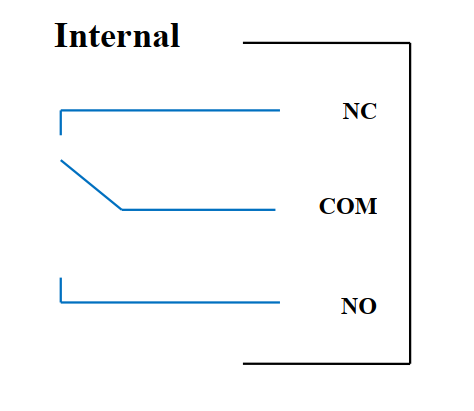
04 channel Relay SPDT NO / NC
Contact rating: 2A / 24VDC, 0.5A / 220VAC
There are status LEDs:
- Led on: Close Contact
- Led off: Open Contact
|
Default Relay Register |
Status of relays when resetting power supplies |
|
3 |
Operate according to the Alarm configuration |
Alarm Configuration:
- HIHI : Relay 4 On
- HI : Relay 3 On
- LO : Relay 2 On
- LOLO: Relay 1 On
5.6 Pulse Output
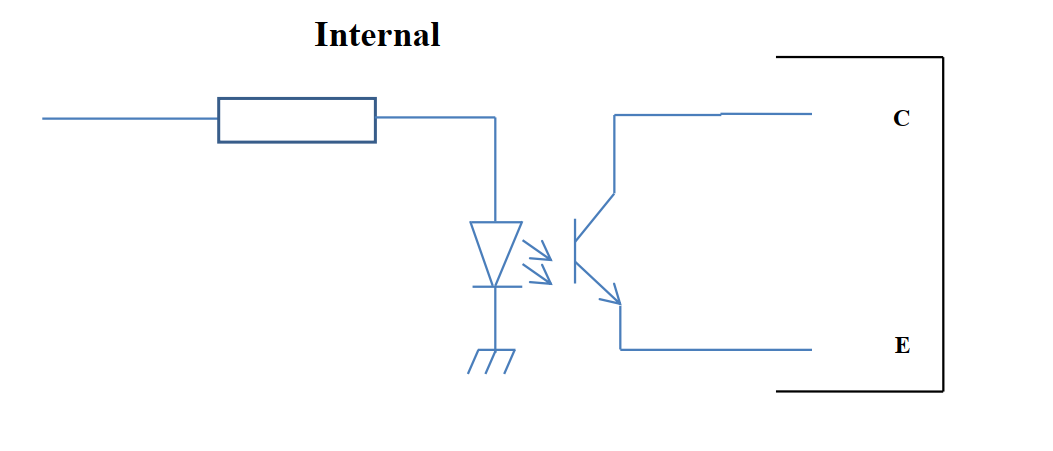
01 isolated open-collector channel
Opto-coupler: Source current Imax = 10mA, Vceo = 80V
Functions: On / Off, pulse generator, PWM
5.6.1 On/Off Function
Set the Open-collector register in the Modbus Memory Map table:
- Set Open-collector register: 1 => Pulse Output ON
- Set Open-collector register: 0 => Pulse Output OFF
5.6.2 Pulse generator
Pulse output transmits a maximum of 65535 pulses, with Fmax 2.5kHz
Configure the following registers in the Modbus Memory Map table:
- Set register "open collector: pulse number": 0-65535 => Pulse Number = 65535: broadcast 65535 pulses
- Set register "open collector: time cycle": (0-65535) x0.1ms => Time Cycle = 4: Fmax 2.5kHz
- Set register "open collector: time on": (0-65535) x0.1ms => Time On: is the logic time 1 of the pulse
- Set the register "open collector ctrl" = 3 => configure the Pulse Output to generate a pulse and start to pulse, generate a sufficient number of pulses in the "open collector: pulse number" register => stop pulse generator and register " open collector ctrl ”= 0
5.6.3 PWM
Max frequency 2.5kHz
Configure the following registers in the Modbus Memory Map table:
- Set the register "open collector ctrl" = 2 => configure Pulse Output PWM function
- Set register "open collector: time cycle": (0-65535) x0.1ms => Time Cycle = 4: Fmax 2.5kHz
- Set register "open collector: time on": (0-65535) x0.1ms => Time On: is the logic time 1 of the pulse
6. Installation
6.1 Installation method
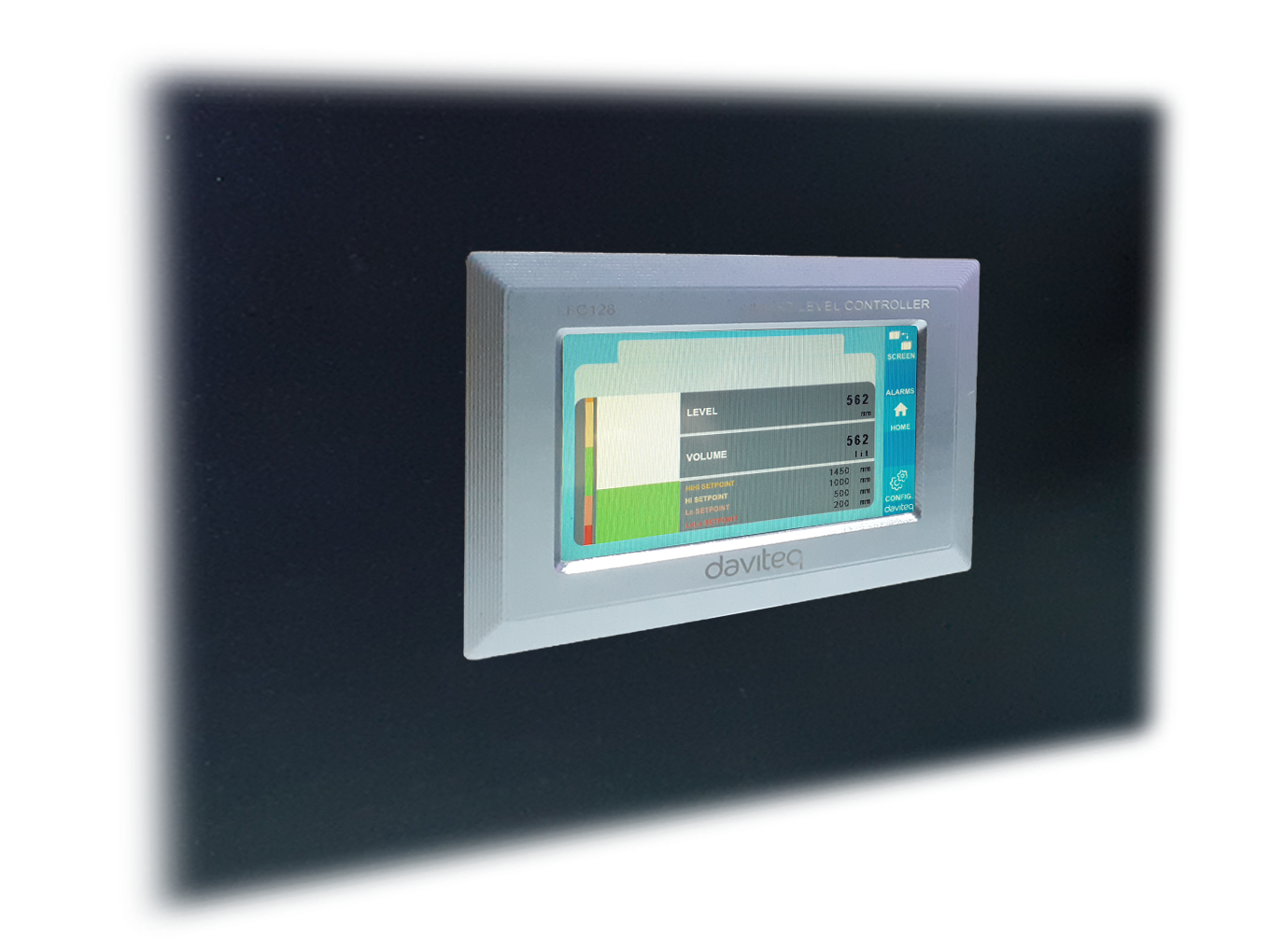
Panel mount
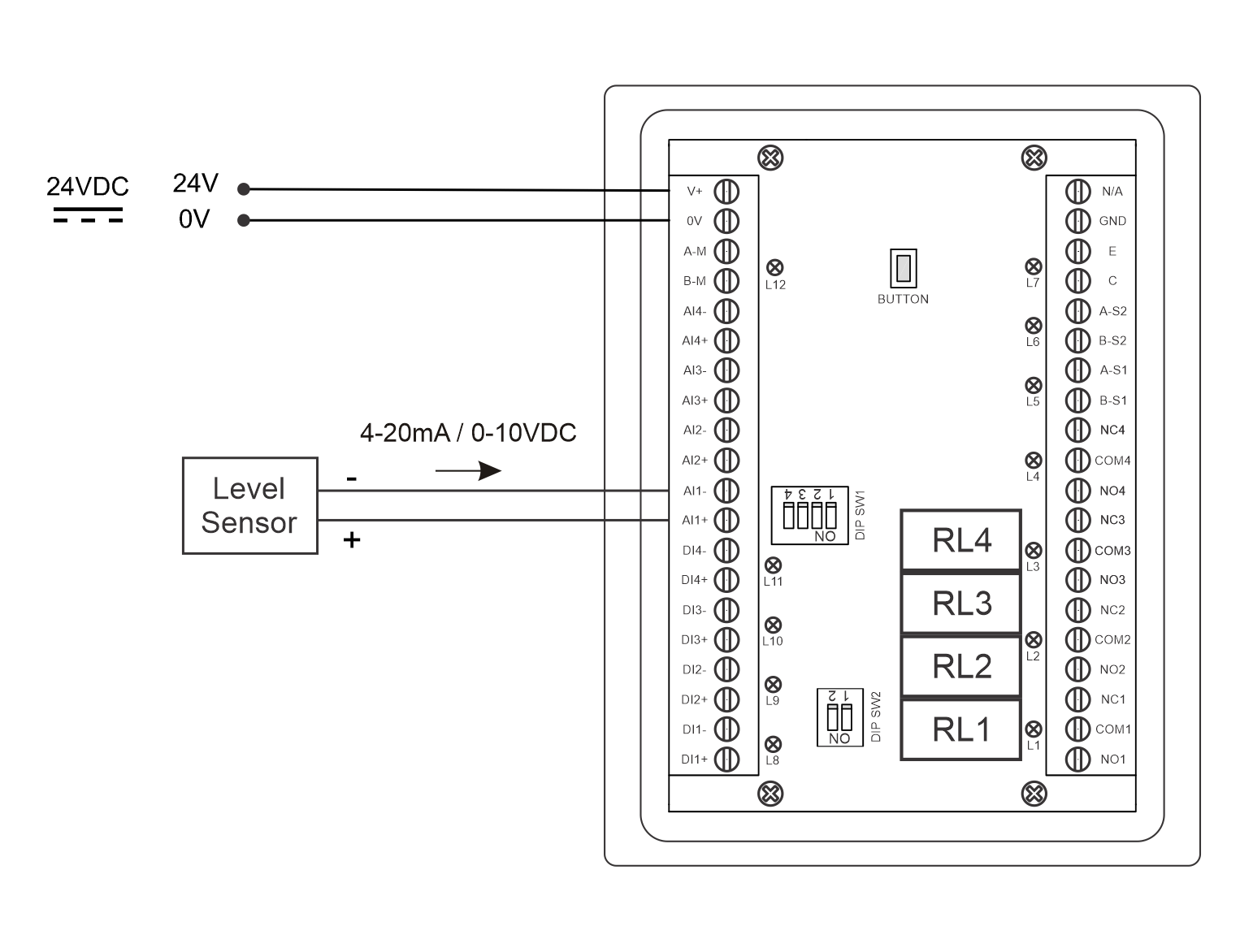
6.2 Wiring with Level Sensor
7. Configuration
7.1 Home Screen
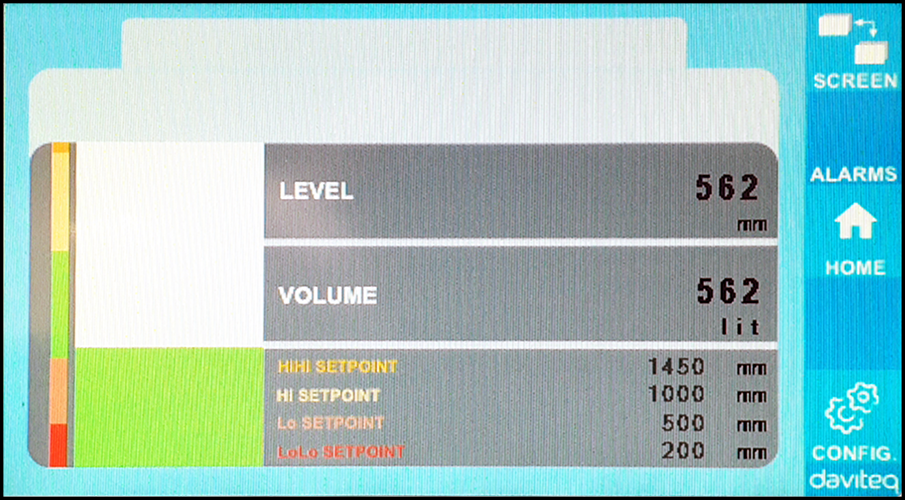
SCREEN: Switch to 2nd screen with more detailed information
ALARMS: Show Level Alert
HOME: Return to Home Screen
CONFIG. (Default Password: a): Go to Setting Screen
7.2 Setting screen (Default Password: a)
7.2.1 Screen 1
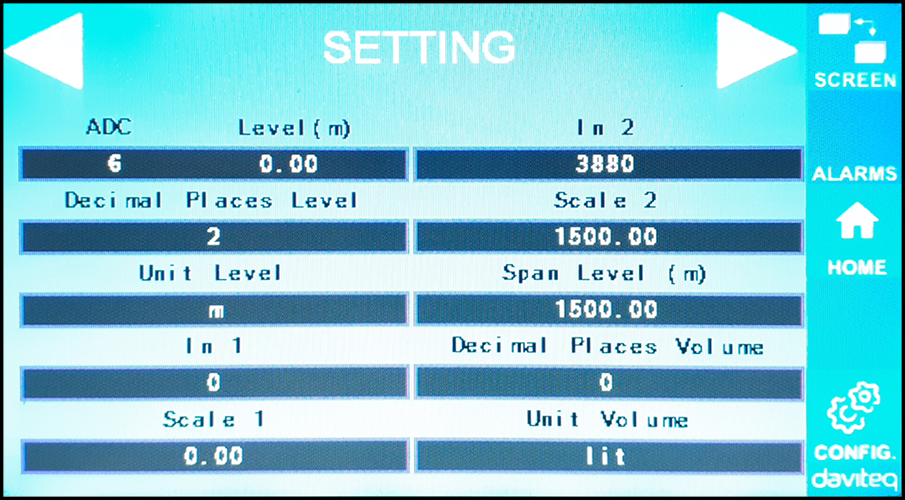
ADC: Raw signal value of channel AI1
Level (Unit): The level corresponds to the ADC signal after configuration
Decimal Places Level:Decimal number of digits after the dot of Level 0-3 (00000, 1111.1, 222.22, 33.333)
Unit level: level units, 0-3 (0: mm, 1: cm, 2: m, 3: inch)
In 1: Enter the ADC value after putting 4 mA / 0 VDC into AI1 for calibration at 0 level
Scale 1: The level value displayed corresponds to the value entered in In 1 (usually 0)
In 2: Enter the ADC value after putting 20 mA / 10 VDC into AI1 for calibration at Full level
Scale 2: The level value displayed corresponds to the value entered in In 2
Span Level: Maximum value of Level (Span Level ≥ Scale 2)
Decimal Places Volume: Decimal number of digits after the dot of Volume 0-3 (00000, 1111.1, 222.22, 33.333)
Unit Volume: units of volume 0-3 (0: lit, 1: cm, 2: m3, 3:%)
7.2.2 Screen 2
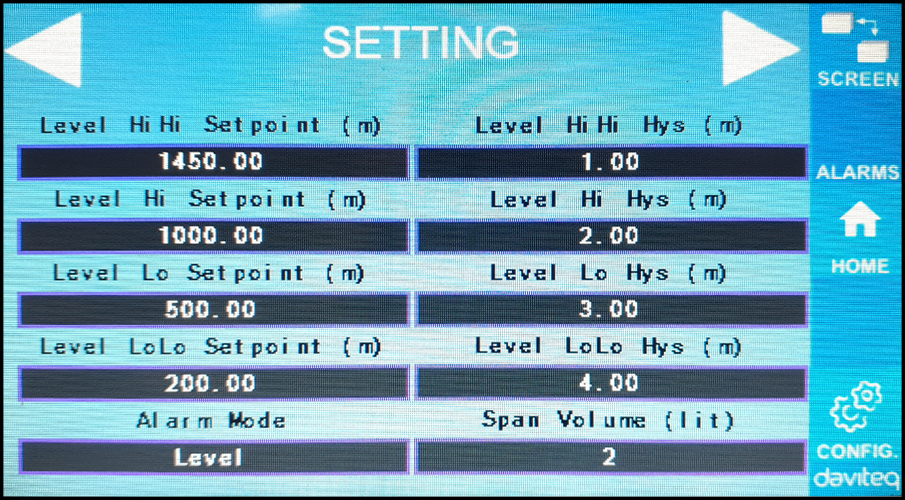
Level Hi Hi Set point (Unit): High High level of Alarm Level
Level Hi Hi Hys (Unit): High High level hysteresis of Alarm Level
Level Hi Set point (Unit): High level of Alarm Level
Level Hi Hys (Unit): High level hysteresis of Alarm Level
Level Lo Set point (Unit): Low level of Alarm Level
Level Lo Hys (Unit): Low level hysteresis of Alarm Level
Level Lo Lo Set point (Unit): Low Low level of Alarm Level
Level Lo Lo Hys (Unit): Low Low level hysteresis of Alarm Level
Alarm Mode: 0: Level, 1: Volume
Span Volume(Unit): Maximum value of the volume
7.2.3 Screen 3

Volume Hi Hi Set point (Unit): High High volume of Alarm Volume
Volume Hi Hi Hys (Unit): High High volume hysteresis of Alarm Volume
Volume Hi Set point (Unit): High volume of Alarm Volume
Volume Hi Hys (Unit): High volume hysteresis of Alarm Volume
Volume Lo Set point (Unit): Low volume of Alarm Volume
Volume Lo Hys (Unit): Low volume hysteresis of Alarm Volume
Volume Lo Lo Set point (Unit): Low Low volume of Alarm Volume
Volume Lo Lo Hys (Unit): Low Low volume hysteresis of Alarm Volume
Run Total: Run the total function. 0-1 (0: No 1: Yes)
7.2.4 Screen 4

Filling (Unit): Total function: total put into tank
Consumption (Unit): Total function: total consumption of the tank
Decimal Places Total: Decimal number of parameters Filling, Consumption, NRT Filling, NRT Consumption on display page (not the setting page)
Delta Total (Unit): Hysteresis level of the total function
Modbus Address: Modbus address of LFC128-2, 1-247
Modbus Baurate S1: 0-1 (0 : 9600 , 1 : 19200)
Modbus Parity S1: 0-2 (0: none, 1: odd, 2: even)
Modbus Baurate S2: 0-1 (0 : 9600 , 1 : 19200)
Modbus Parity S2: 0-2 (0: none, 1: odd, 2: even)
Num of Points: Number of points in the table to convert from level to volume, 1-166
7.2.5 Screen 5
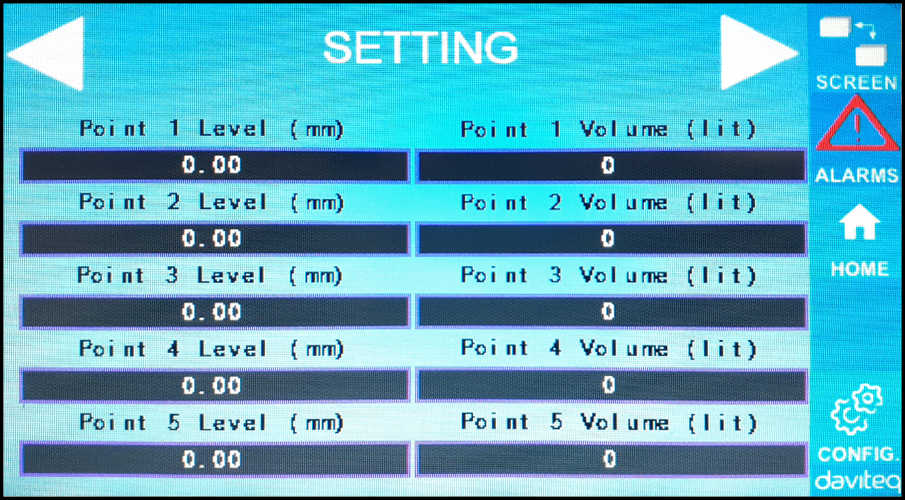
Point 1 Level (Level Unit): Level at Point 1
Point 1 Volume (Volume Unit): The corresponding volume at Point 1
Point 166 Level (Level Unit): Fuel level at Point 166
Point 166 Volume (Volume Unit): The corresponding volume at Point 166
7.2.6 Screen 6

Password: Password to enter the Setting page, 8 ASCII characters
Tank Name: Tank name displayed on the main screen
8. Troubleshooting
| No. | Phenomena | Reason | Solutions |
| 1 | Modbus failed to communicate |
Modbus LED Status:
|
|
| 2 | Timeout Modbus | Noise appears on the line | Configure Baudrate 9600 and use a twisted pair cable with anti-jamming protection |
| 3 | Sensor Disconnected | Sensor and LFC128 lost connection |
|
| 4 | Linearization table error | Error of conversion table from level to volume | Check the configuration of the conversion table from level to volume |
9. Support contacts
|
Manufacturer Daviteq Technologies Inc
No.11 Street 2G, Nam Hung Vuong Res., An Lac Ward, Binh Tan Dist., Ho Chi Minh City, Vietnam. Email: info@daviteq.com | www.daviteq.com |

Panel mount Industrial IoT HMI
Panel mount Industrial IoT HMI
| PHMI-MN-EN-01 |
NOV-2025 |
This document is applied for the following products
| SKU | PHMI | HW Ver. | 1H | FW Ver. | 1F1118 |
| Item Code |
PHMI-10-01 |
Industrial IoT HMI for panel mount, LCD display,10-inch touchscreen; |
|||
1. Functions Change Log
| HW Ver. | FW Ver. | Release Date | Functions Change |
| 1H | 1F1118 | Nov-2025 |
Initial firmware |
2. Introduction
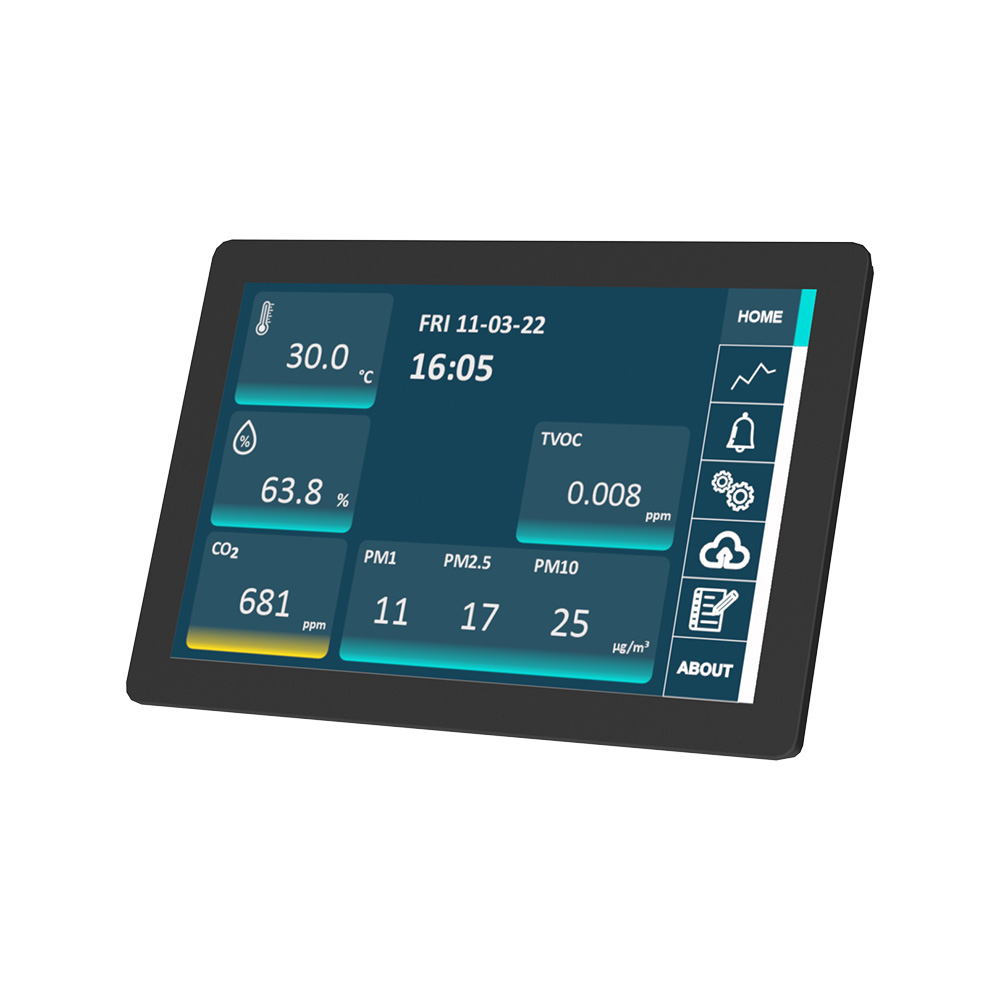
PHMI is an all-in-one industrial HMI device that functions as both a user-friendly interface and an intelligent gateway for Industrial IoT applications. Featuring a 10.1" or 8" IPS LCD multi-touch display, it comes with standard interfaces such as Ethernet, RS485, and USB, along with optional wireless connectivity including WiFi, 4G, and 5G for seamless integration with cloud platforms and IoT systems.
The device is programmable via Node-Red, enabling fast deployment of customized HMI applications. It also supports optional expansions such as a 433 MHz Wireless Concentrator for WS433 sensors, BLE for MESH sensor networks, and a built-in LoRaWAN Gateway for wide-area sensor networks.
With powerful features and flexible architecture, PHMI is the ideal solution for Smart Factory, Smart Building, and Smart Agriculture applications.
3. Specification
| Standard Communication | 01 x RS485, 01 x USB, 01 x RJ45 Ethernet and Wifi |
| Optional Communication | 4G or 5G, BLE, LoRaWAN Gateway, WS433 Sub-GHz Co-ordinator |
| Protocol support | ModbusRTU/ASCII, ModbusTCP, BacnetIP, OPC-UA, EthernetIP, MQTT, HTTP... |
| Screen type | 10.1" 1290x800 colour IPS LCD Display with capacitive touch screen |
| Power supply | 5VDC via USB type C port. Included power adapter with input of 100-240VAC and output USB type C 5VDC max 5A |
| Consumption | 500mA avg. |
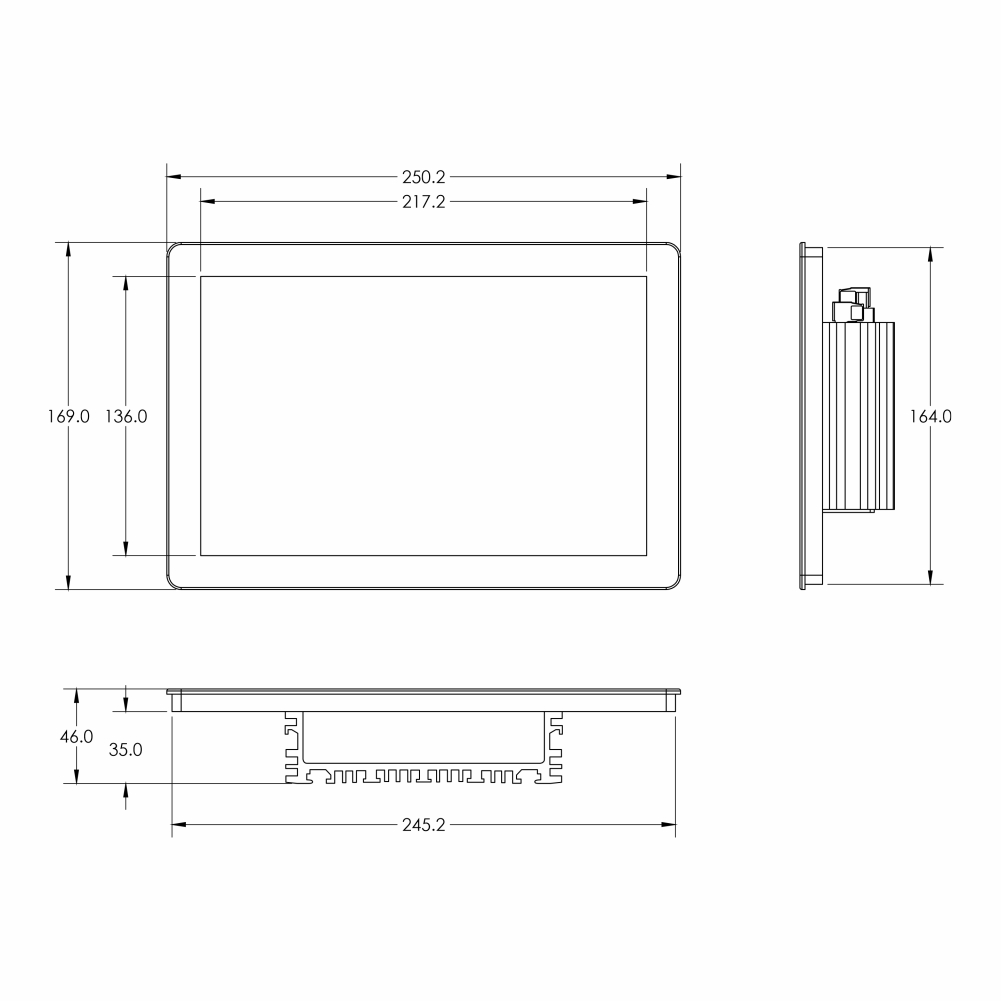
| Mounting type | Panel mount 246x165 mm cut-out, VESA mount screws |
| Working temperature/humidity | 0..60 degC / 95%RH non-condensing |
| Dimension | H169xW250xD50 |
| Net weight | 750 grams.. |
4. Installation and wirings
4.1 Installation
Installation type: Panel mount
Installation steps:
Step 1: Based on HMI dimension, cut the rectangular hole on the panel
Step 2:
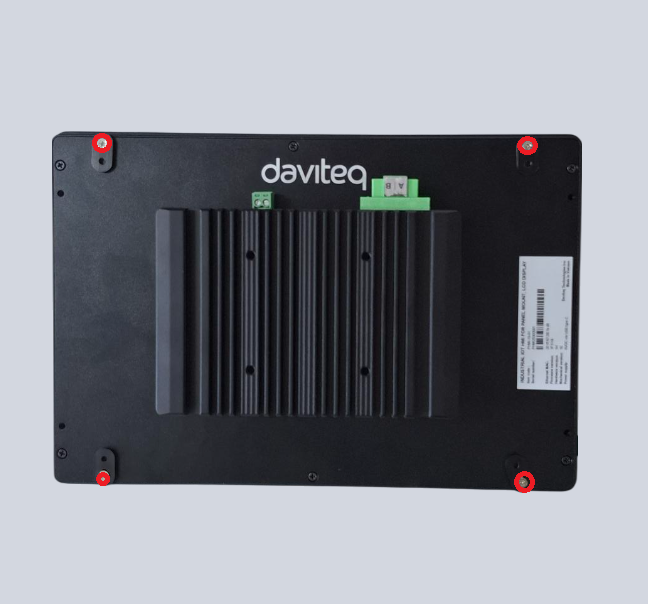
Use screw driver to loose 4 screws, then turn 4 batches 90 degree
Step 3:
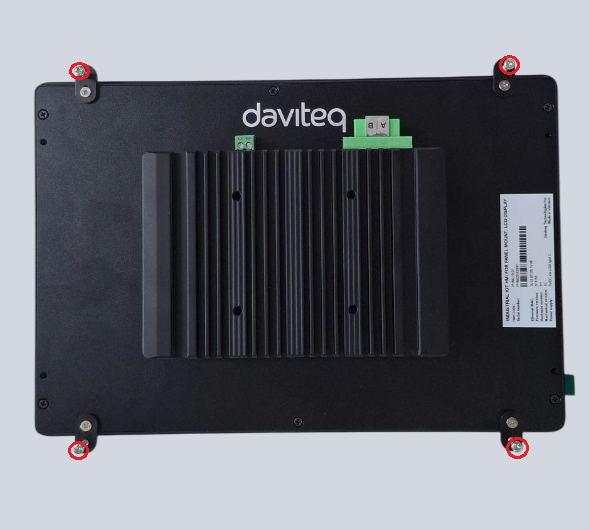
Fix 4 batches to the panel by 4 provided bolts
4.2 Wiring
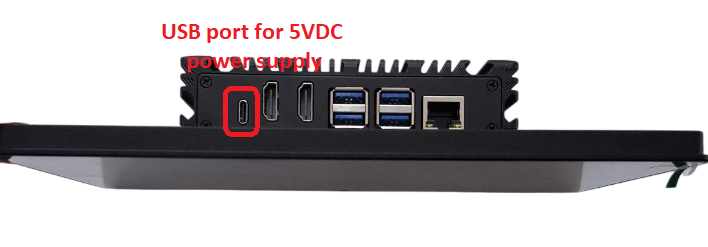
Power Supply:
5VDC via USB type C port. The product is provided with power adapter having input of 100-240VAC and output USB type C 5VDC max 5A
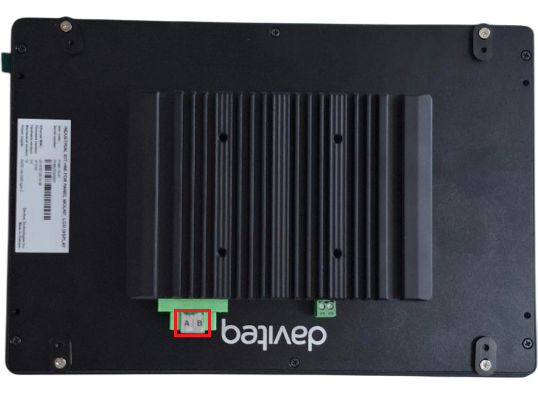
RS485 connection:
RS485+ of Modbus Master to A pin on HMI
RS485 - of Modbus Master to B pin on HMI
5. Operation principle
The HMI operates as Modbus slave device. The Modbus Master device will write real time values to HMI via RS485 Modbus RTU and HMI will show these values on HMI screens. The clock time on Modbus Master device also be written on HMI.
6. Configuration
HMI operate with Modbus RTU - slave communication via RS485 port as below fixed configurations:
Protocol: Modbus RTU
Address: 2
Baud rate: 9600
Parity: none
Stop bit: 1
7. Graphic user interface
7.1 Home Screen
After power up, the HOME screen will show 5 rows x 4 columns = max 20 data from Modbus Masters
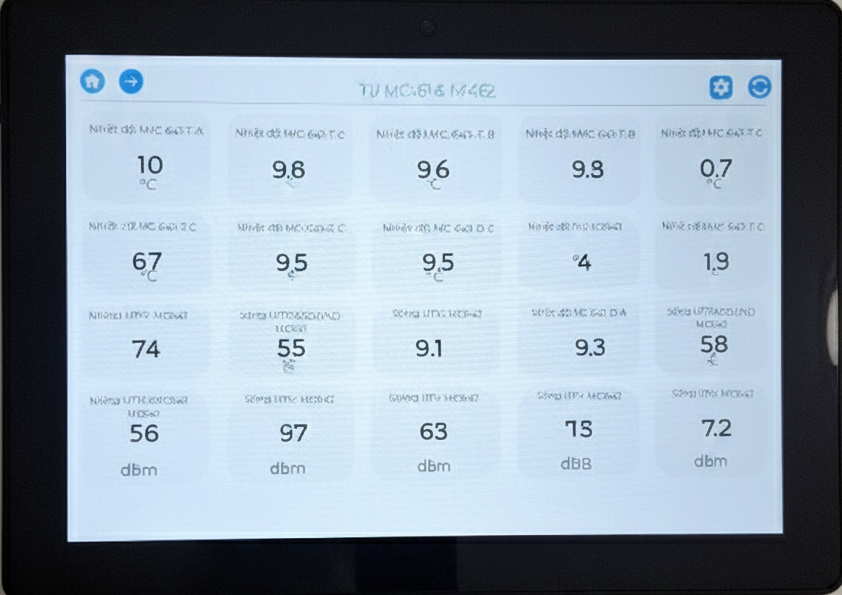
HOME icon: Click to return home page
LEFT ARROW icon: Click to move to next page
RIGHT ARROW icon: Click to move to previous page
REFRESH icon: Click to refresh data
7.2 Other screens
There are total four screens, click RIGH ARROW icon and LEFT ARROW icon to navigate screens and click HOME icon to return HOME screen. Each screen shows maximum 20 paramter values which are written from Modbus Master device
8. Support contacts
|
Manufacturer Daviteq Technologies Inc
No.11 Street 2G, Nam Hung Vuong Res., An Lac Ward, Binh Tan Dist., Ho Chi Minh City, Vietnam. Email: info@daviteq.com | www.daviteq.com |