Product Warranty and Support
- Warranty Terms and Support for Daviteq Products and Services
- Procedure for Product return for warranty
- Welcome to the Daviteq' Online Product Manuals
- Instruction to update the firmware for Seismic Sensor
Warranty Terms and Support for Daviteq Products and Services
The following terms and conditions apply to products manufactured and supplied by Daviteq Technologies Inc., unless otherwise specified in the quotation, contract, purchase agreement, or product documentation.
1. Warranty
1.1 Free Warranty Conditions
Daviteq warrants that the product shall be free from defects in materials and workmanship for a period of 12 months from the shipment date, unless otherwise specified in the quotation, contract, purchase agreement, or product documentation.
The warranty period shall commence from the shipment date as recorded in Daviteq’s invoice, delivery note, shipping document, or internal system record, unless otherwise agreed in writing.
A product shall be eligible for free warranty service if all of the following conditions are met:
- The product failure is caused by defects in materials or workmanship attributable to Daviteq.
- The product is still within the applicable warranty period.
- The product serial number, label, and warranty seal remain intact, legible, and unaltered. They must not be removed, erased, modified, scratched, torn, blurred, stained, covered, or replaced.
- The product has been installed, operated, and maintained in accordance with Daviteq’s instructions, documentation, datasheet, user manual, and recommended operating conditions.
- No unauthorized repair, modification, disassembly, reverse engineering, or intervention has been performed on the product.
- The product has been used within its specified technical limits, including but not limited to power supply, operating temperature, humidity, ingress protection rating, communication range, load rating, and environmental conditions.
During the warranty period, if any technical issue occurs, the customer shall contact Daviteq Support Center and provide the product model, serial number, fault description, operating conditions, installation photos, error logs, and relevant photos or videos if available.
After inspection, if the product is confirmed by Daviteq to have failed due to a manufacturing defect, Daviteq will determine the appropriate remedy, which may include repair, replacement with an equivalent product, firmware recovery, or another suitable solution.
Repair, replacement, or other remedy determined by Daviteq shall be the customer’s sole and exclusive remedy for products covered under warranty.
Shipping cost: The customer shall bear the one-way shipping cost for returning the product to Daviteq’s designated Return Center. For products confirmed by Daviteq to be covered under free warranty, Daviteq shall bear the return shipping cost to the customer, unless otherwise agreed in writing.
1.2 Warranty Exclusions and Paid Repair Conditions
The product shall not be eligible for free warranty service under the following conditions:
- The warranty period has expired.
- The product was not manufactured by Daviteq. Products, accessories, or components not manufactured by Daviteq are subject to the original manufacturer’s warranty policy, if applicable.
- The product failure or damage is caused by natural disasters or external events, including but not limited to fire, flood, lightning, explosion, earthquake, storm, or other force majeure events.
- The product is damaged during transportation, unless such damage is proven to be caused by Daviteq’s packaging fault or otherwise agreed in writing.
- The product is damaged due to incorrect installation, improper use, incorrect wiring, unsuitable power supply, overload, short circuit, reverse polarity, poor grounding, unstable electrical source, or operation outside the specified technical limits.
- The product is damaged due to misuse, negligence, accident, vandalism, sabotage, intentional damage, or other causes attributable to the customer, end user, installer, contractor, or third party.
- The product is corroded, rusted, stained, contaminated, burned, deformed, or damaged due to harsh environmental conditions, chemicals, acids, liquids, moisture ingress, condensation, dust, insects, animals, or other external substances beyond the product’s specified protection rating.
- The product has been repaired, modified, disassembled, reverse engineered, reworked, reprogrammed, or otherwise interfered with by unauthorized parties.
- The product serial number, label, or warranty seal is missing, illegible, altered, damaged, removed, replaced, or inconsistent with Daviteq’s records.
- The issue is caused by software configuration, incorrect parameter settings, firmware modification, third-party software, SIM card, network connectivity, firewall, gateway configuration, cloud/server interruption, cybersecurity events, API changes, or integration with non-Daviteq systems, unless confirmed by Daviteq to be caused by a defect in Daviteq’s product.
- The issue is caused by improper storage, long-term non-use, battery depletion, battery leakage, or storage conditions outside Daviteq’s recommended conditions.
- Consumable parts, batteries, cables, antennas, connectors, adapters, mounting accessories, enclosures subject to wear and tear, and other consumable or accessory items are not covered under the standard warranty unless otherwise specified in Daviteq’s quotation, contract, or product documentation.
- The product is used for applications, environments, or safety-critical systems for which it was not designed, approved, or recommended by Daviteq.
For products not covered under free warranty, Daviteq may provide inspection, repair, replacement parts, or replacement products on a chargeable basis, subject to product condition, technical feasibility, and parts availability.
Costs: The customer shall bear all inspection, repair, replacement, parts, labor, and two-way shipping costs for products not covered under free warranty, unless otherwise agreed in writing.
Shipping risk: The customer is responsible for proper packaging and assumes all risks of loss or damage during shipment to Daviteq’s designated Return Center. Daviteq shall not be liable for products lost or damaged during return shipment to Daviteq.
Customer data and configuration: The customer is responsible for backing up all data, configuration, firmware settings, passwords, application parameters, and integration information before returning any product. Daviteq shall not be responsible for any loss of data, configuration, customized settings, or application parameters during inspection, repair, replacement, or firmware recovery.
Dispute resolution: In case of disagreement regarding the cause of damage, both parties may agree to appoint an independent third-party inspection organization. The inspection result shall be considered final and binding, unless otherwise agreed in writing. The inspection cost shall be borne as agreed by both parties or by the party found to be responsible.
Limitation of liability: Daviteq shall not be liable for any indirect, incidental, special, punitive, or consequential damages, including but not limited to loss of production, loss of revenue, loss of profit, loss of data, downtime, business interruption, removal or reinstallation costs, third-party claims, or any other commercial loss, except as required by applicable law. Daviteq’s total liability under this warranty shall not exceed the purchase price paid by the customer for the defective product giving rise to the claim.
1.3 Out-of-Warranty Repair and Replacement
For products outside the warranty period or excluded from free warranty, Daviteq may offer repair, replacement parts, replacement products, or technical recommendations on a chargeable basis.
Daviteq reserves the right to determine whether a product is technically repairable. In some cases, repair may not be available due to product condition, discontinued components, obsolete design, safety risk, or lack of spare parts.
Any repaired or replaced product outside the free warranty scope may be subject to a limited repair warranty as specified in Daviteq’s repair quotation or service confirmation.
1.4 Product Replacement
Replacement products may be new, equivalent, refurbished, upgraded, or functionally comparable products at Daviteq’s discretion. Replaced products or parts shall become the property of Daviteq unless otherwise agreed in writing.
Replacement of a product or part does not restart or extend the original warranty period, unless otherwise required by applicable law or agreed in writing. The replacement product or part shall continue to be covered for the remaining period of the original warranty.
1.5 No Fault Found
If Daviteq inspects a returned product and no defect is found, or if the issue is caused by external conditions, incorrect installation, incorrect configuration, network issues, or user operation, the product shall not be considered defective under warranty.
In such cases, Daviteq may charge inspection, testing, handling, and return shipping costs, unless otherwise agreed in writing.
2. Supports
2.1 Support via Email
For technical support, please contact Daviteq Support Center at support@daviteq.com.
To help Daviteq process the support request efficiently, the customer should provide the product model, serial number, firmware version, installation photos, wiring diagram, system configuration, issue description, operating conditions, and relevant photos, videos, or logs if available.
2.2 Return Products for Warranty
During the support process, Daviteq may instruct the customer to return the product for inspection, repair, or replacement. Return procedures shall be applied according to Daviteq’s RMA instruction.
Products returned to Daviteq must be properly packed, clearly marked with the RMA number, and accompanied by sufficient product information and fault description.
2.3 Urgent Support
In special cases, Daviteq may provide quick support via WhatsApp during business hours from Monday to Friday, excluding public holidays as prescribed by applicable law.
08:00 AM - 12:00 AM, GMT+7
01:30 PM - 05:00 PM, GMT+7
Whatsapp Number: +84.906.885.858
Urgent support is provided on a best-effort basis during business hours and does not constitute a guaranteed response time or service level agreement unless otherwise agreed in writing.
2.4 Support Scope
Daviteq’s standard support may include product usage guidance, troubleshooting assistance, configuration guidance, firmware recovery recommendation, and warranty handling instructions.
Standard support does not include on-site service, system integration, custom software development, third-party device troubleshooting, network infrastructure troubleshooting, cloud/server administration, or customer application debugging, unless otherwise agreed in a separate service agreement.
2.5 Service Level Agreement
Unless a separate Service Level Agreement is signed, Daviteq does not guarantee a fixed response time, resolution time, uptime, or on-site support commitment. Any support timeline communicated by Daviteq shall be considered an estimate only.
3. Company Contacts
|
Manufacturer Daviteq Technologies Inc
No.11 Street 2G, Nam Hung Vuong Res., An Lac Ward, Ho Chi Minh City, Vietnam. Email: info@daviteq.com | https://iot.daviteq.com |

This warranty policy may be updated by Daviteq from time to time. The applicable warranty terms shall be those stated in Daviteq’s quotation, contract, purchase agreement, product documentation, or the warranty policy effective at the time of shipment, unless otherwise agreed in writing.
Procedure for Product return for warranty
To begin with product return for warranty, please follow these steps.
Step 1 - Go to Customer Portal
Link: https://daviteq.supportsync.com/
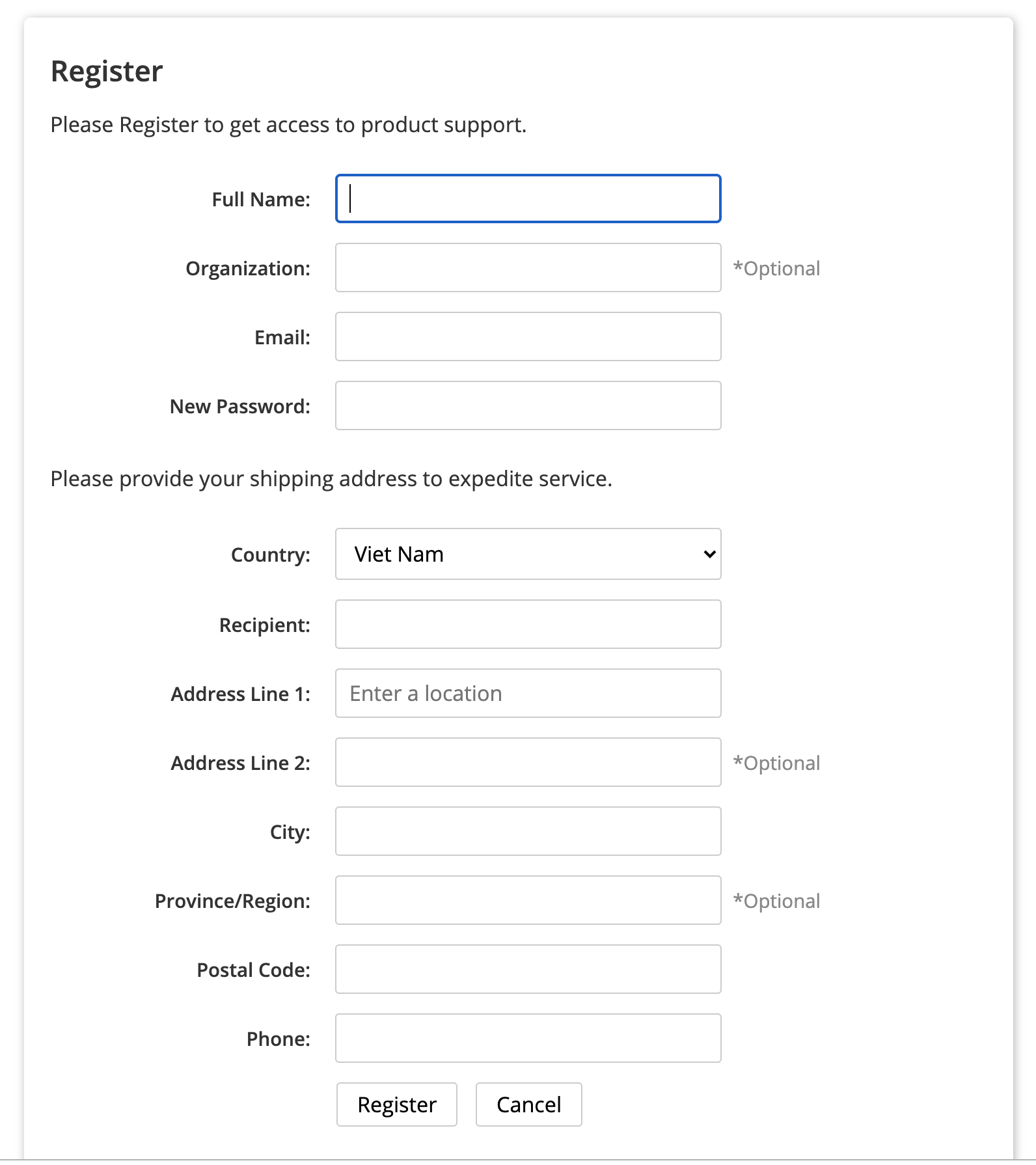
Step 2 - Register
- Press the Register button at the right top of the page.
- Enter the information: Full name. Organization, Email, Password and Shipping information
We highly recommend you to input Shipping information so that our RMA system can use that info for receiving/shipping purposes;
Step 3 - Log in the Portal
- Log in with your email and password
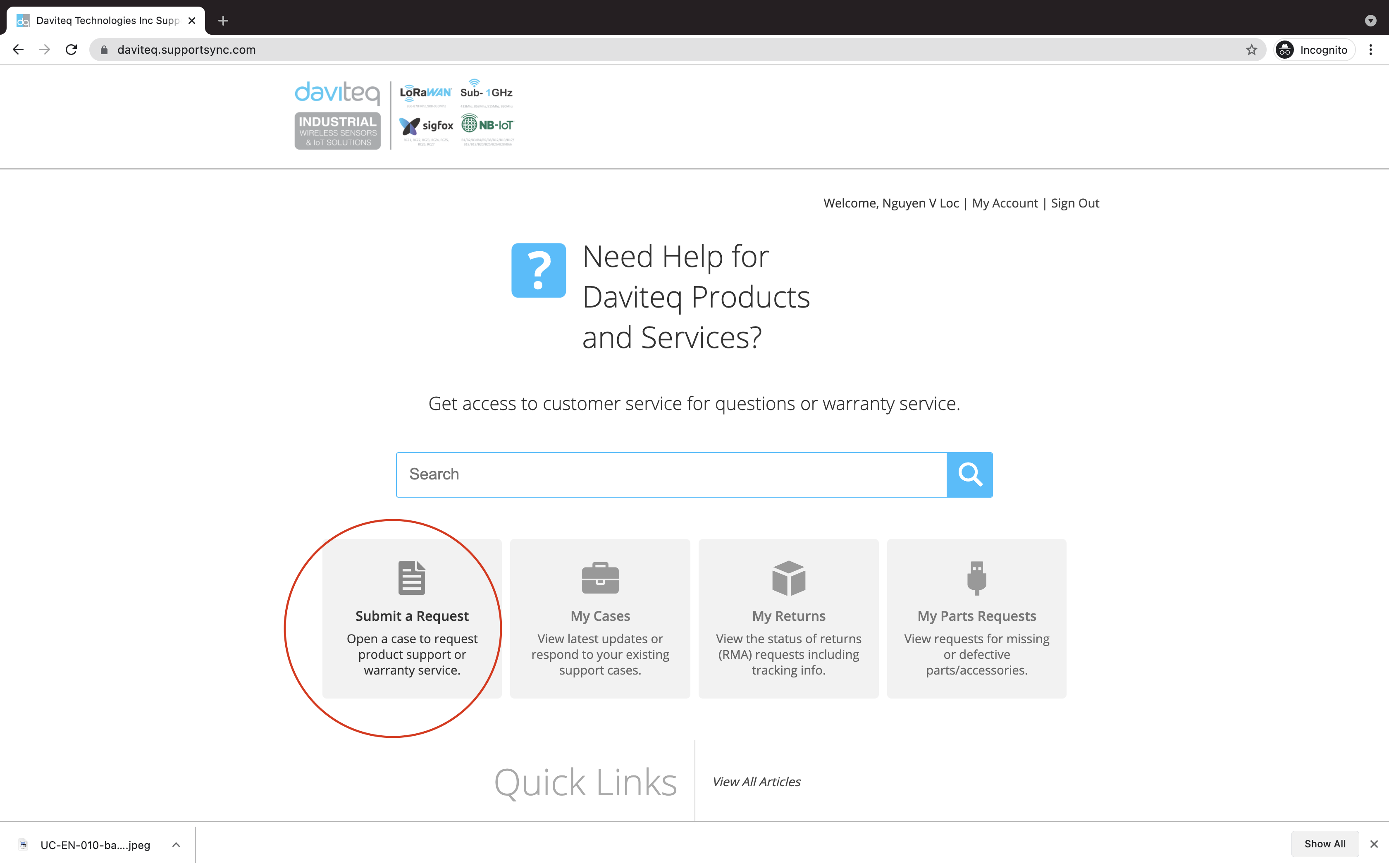
Step 4 - Submit a Request
- Fill in the information:
- Select Product: please select the correct product code;
- Select Case type: Question for support, Return Request for returning product for warranty;
- Subject: Please fill in the subject for easy follow up
- Description: please input as below
- Product code and quantity to return;
- List of S/N:
- Reason to return: please describe the details of error, defective....as much as possible.
- Add files: you can attached pictures to prove the reasons above.
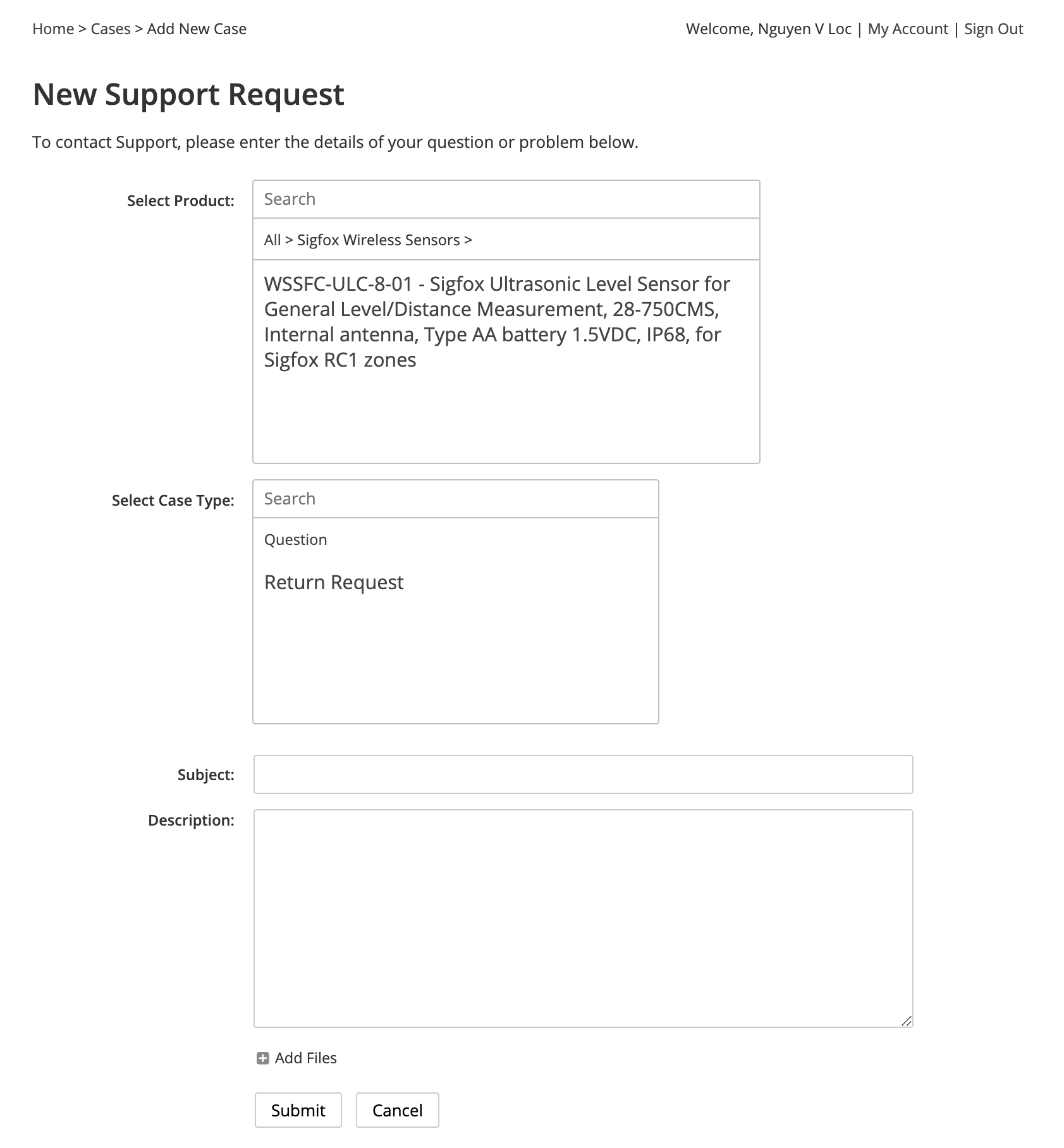
- Then press Submit.
After submit the request, you can check your email and this portal to see the updated status of request.
Thank you.
Daviteq Support Team.
Welcome to the Daviteq' Online Product Manuals
On this page, you can find user manuals as well as product specifications, warranty, and support information.
Some documents are confidential and require customers to have an access account. Please contact us via this contact form. Please input the reason you want to have the access account.
Thank you very much!
Daviteq Technologies Inc
Instruction to update the firmware for Seismic Sensor
1. Preparation
- A J-link firmware update cable tool
- An updated firmware of the sensor on the PC for flashing to the sensor.
- A computer run on Windows 7 or higher
- A SEGGER FLASHER software to update the firmware: Download the software at below link, click the installation file and click Next button to install the software to the PC.
Software link: https://www.segger.com/downloads/flasher/Flasher_Windows_x86_64.exe
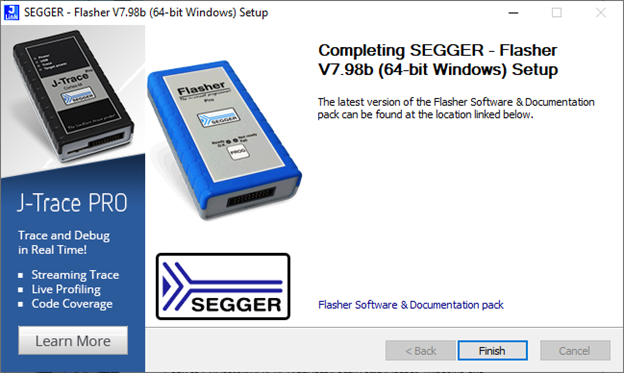
If the PC run on other operating systems, please download a relevant SEGGER FLASHER software at link: https://www.segger.com/downloads/jlink/
2. Update the firmware
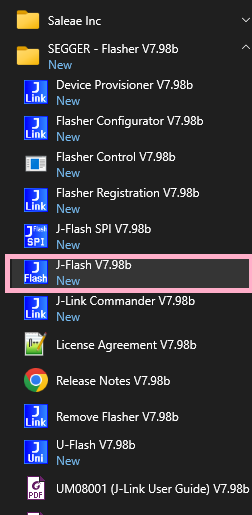
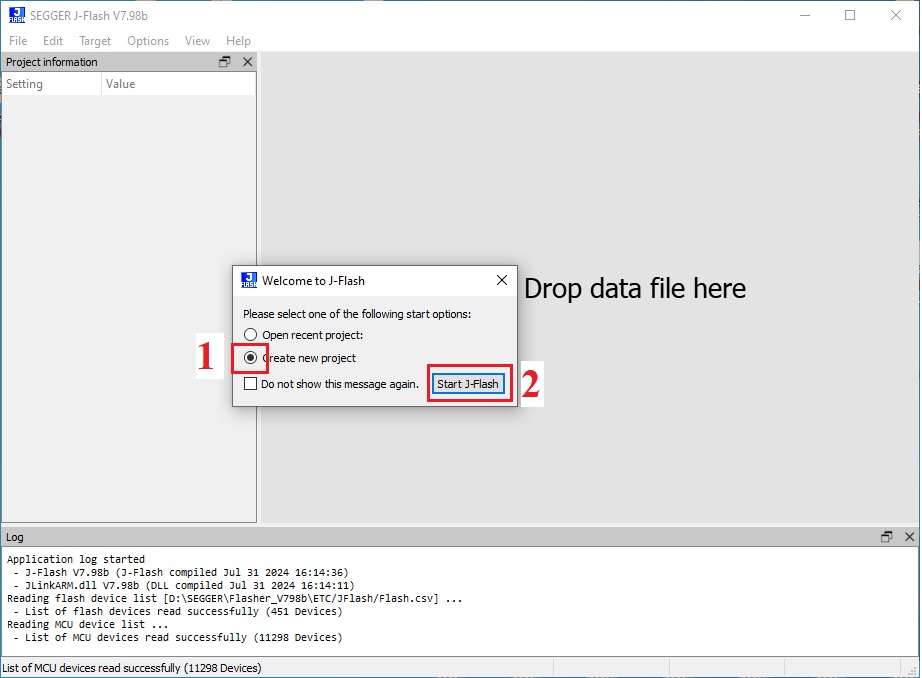
Tick to select Create new project, click Start J-Flash button
Click browser icon
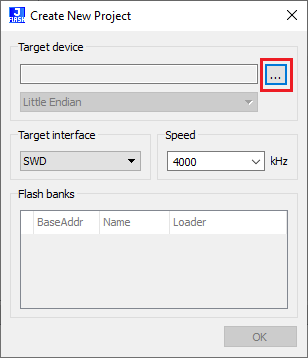
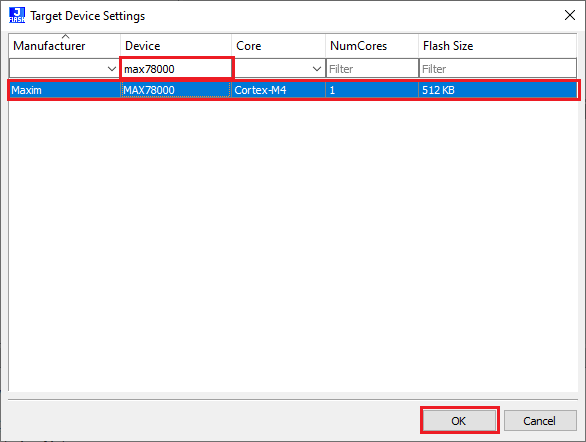
Find with Device max78000 , click to choose and Click OK
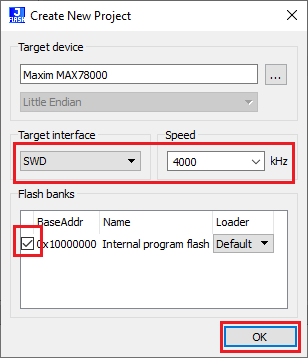
Select speed 400 kHz, and tick 0x10000000 Internal program flash, then click OK
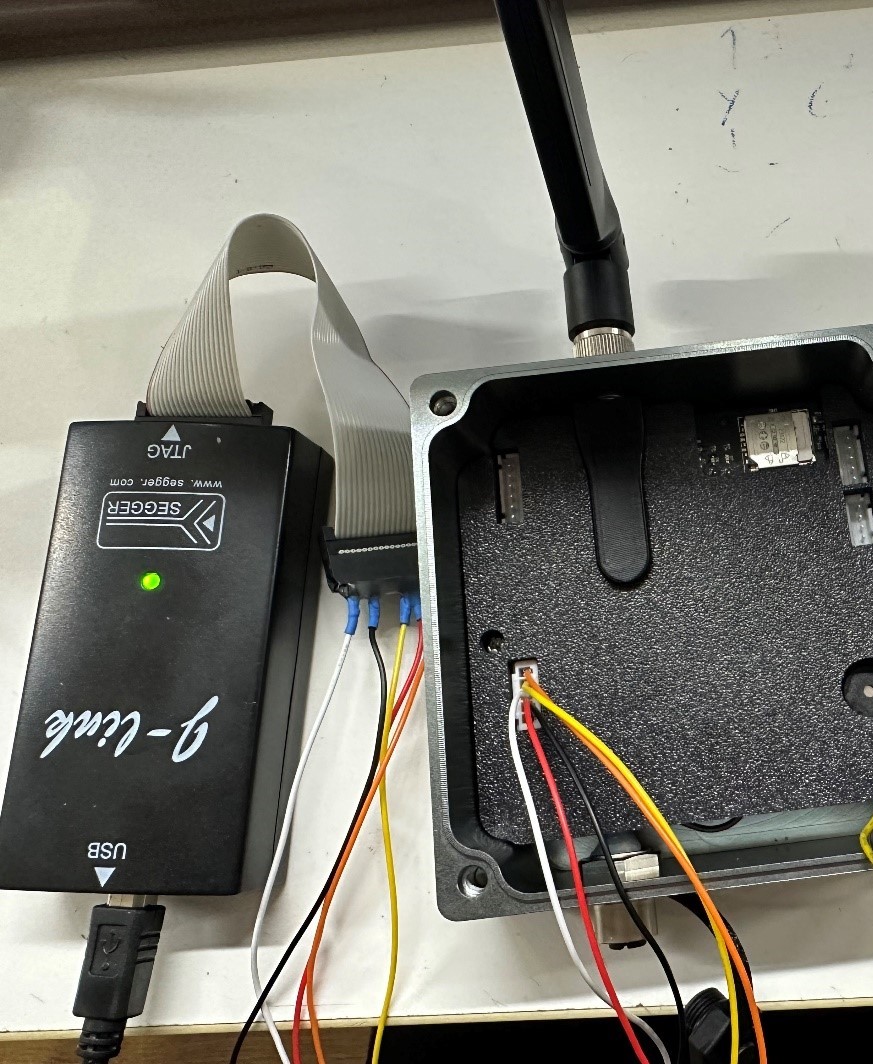
Connect the firmware update cable tool to the PC and the sensor
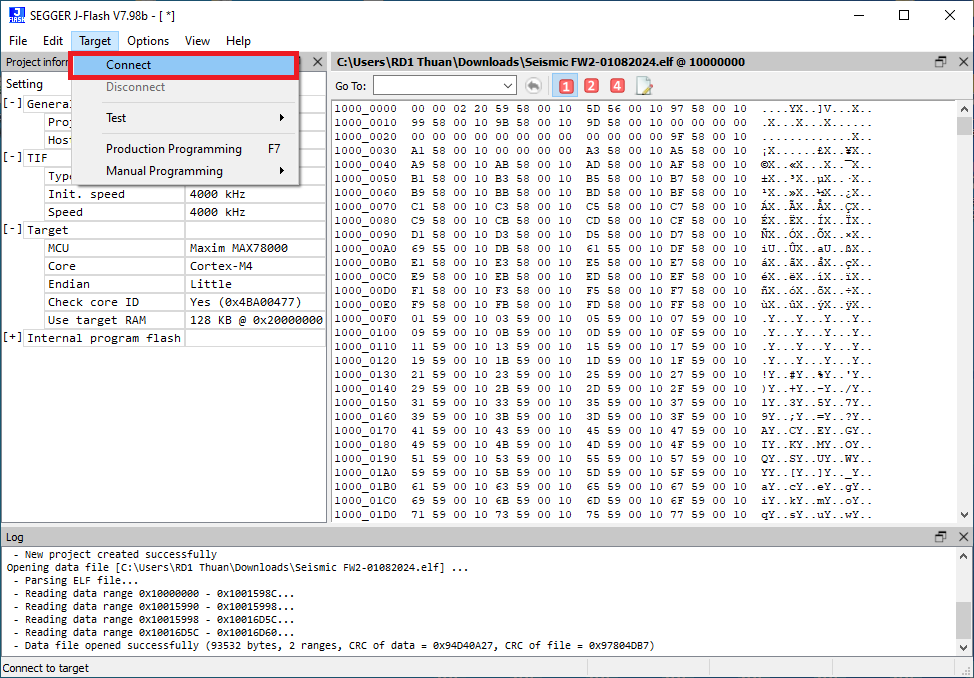
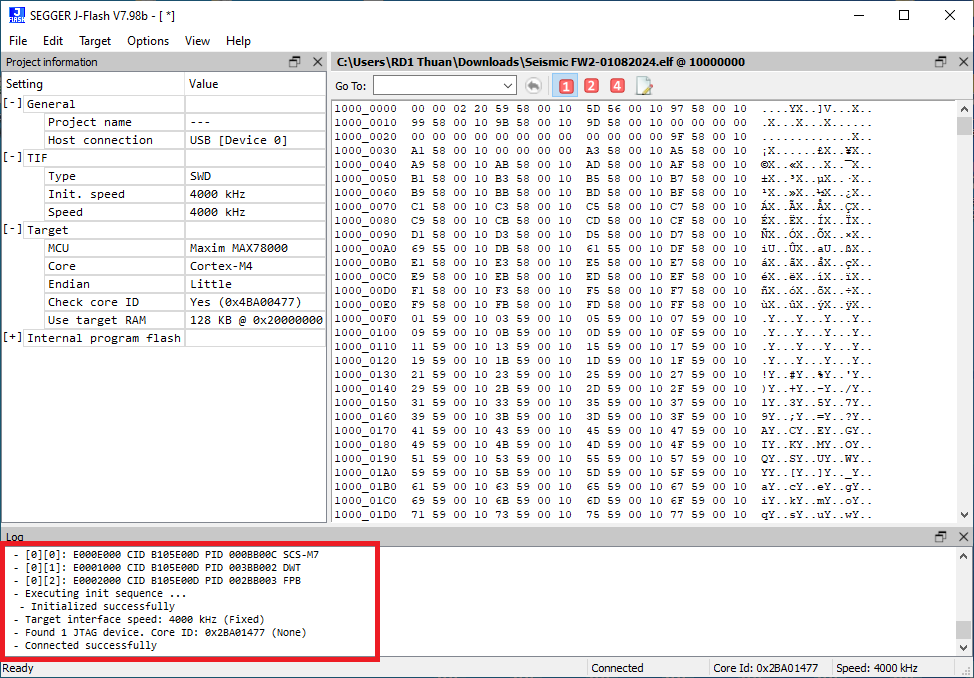
The software will inform the successful connection
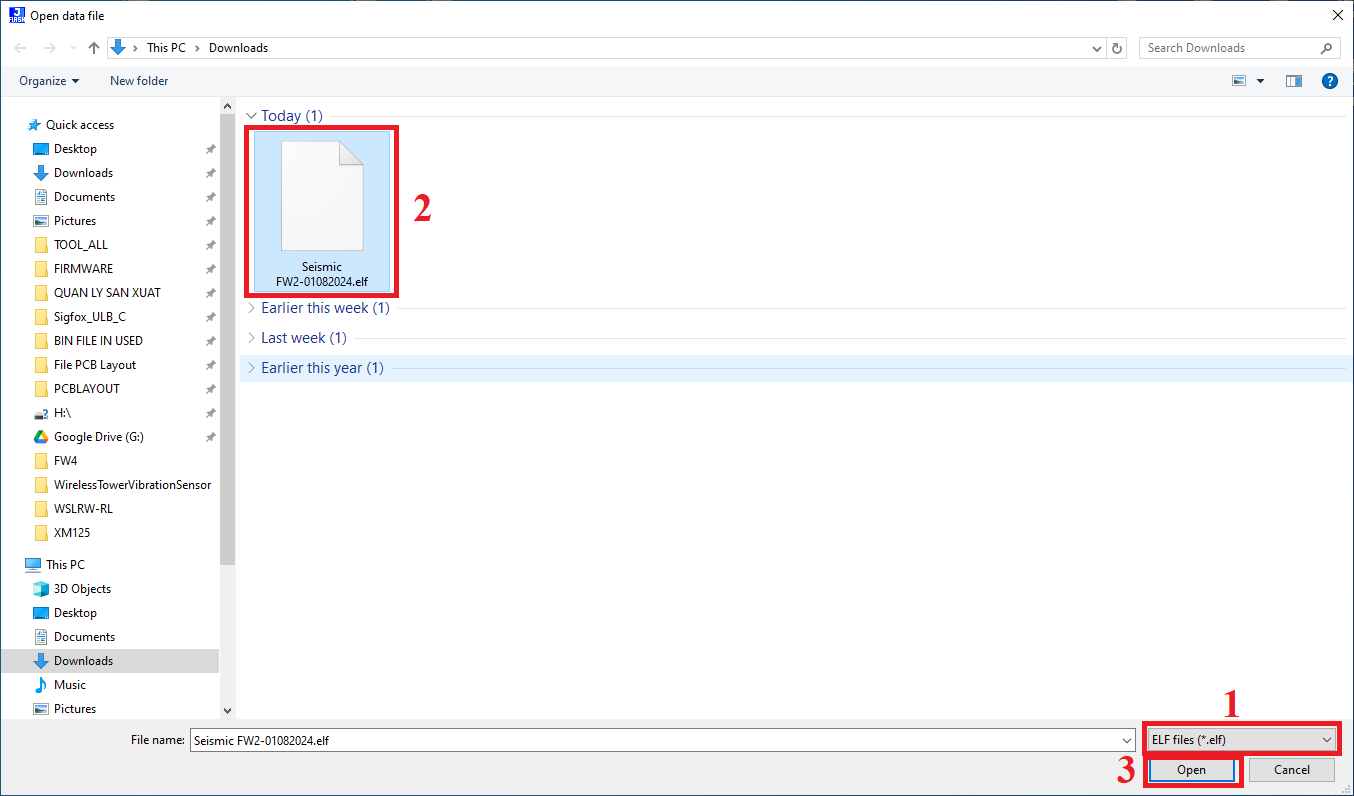
Click File menu, click Open data file, browse to the firmware file on the PC, select .elf file type, select the firmware file, then click Open button
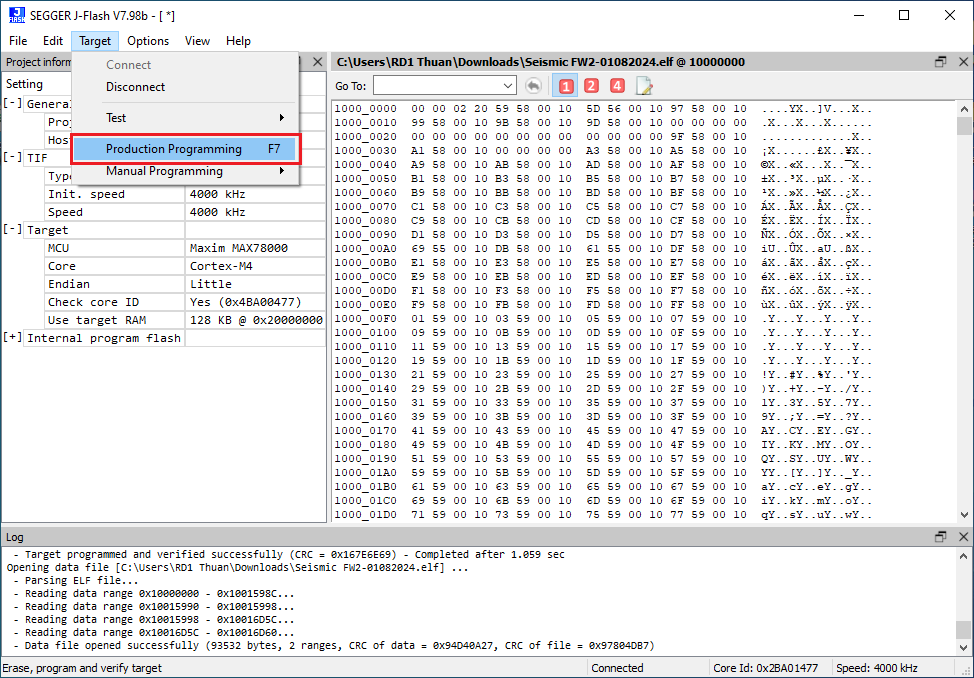
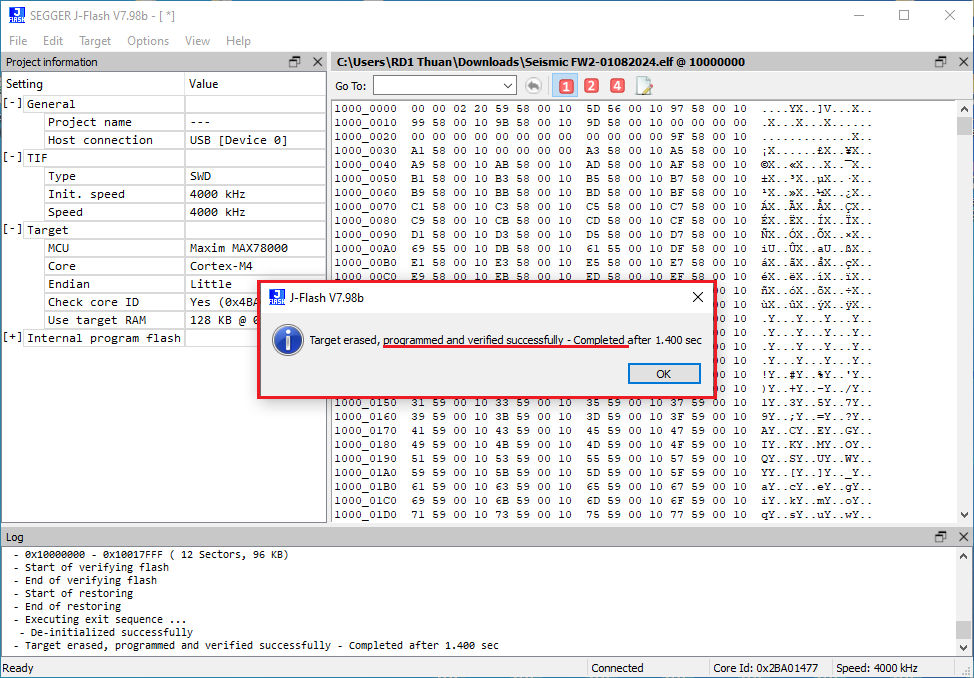
After that the software will notify the popup of the successful update